
Sleeping
Document register
- Poster1 pagePublished
- Presentation videoYouTubePublished
- Bill of materials127 KBPublished
- Team description paperNot shared
- Engineering journal41 pagesPublished
- Source code4.0 MB · GitHubPublished
Sharing each document is the team's decision. “Not shared” means this team chose not to publish it, or did not submit one — not that it is missing from the archive.
In their words
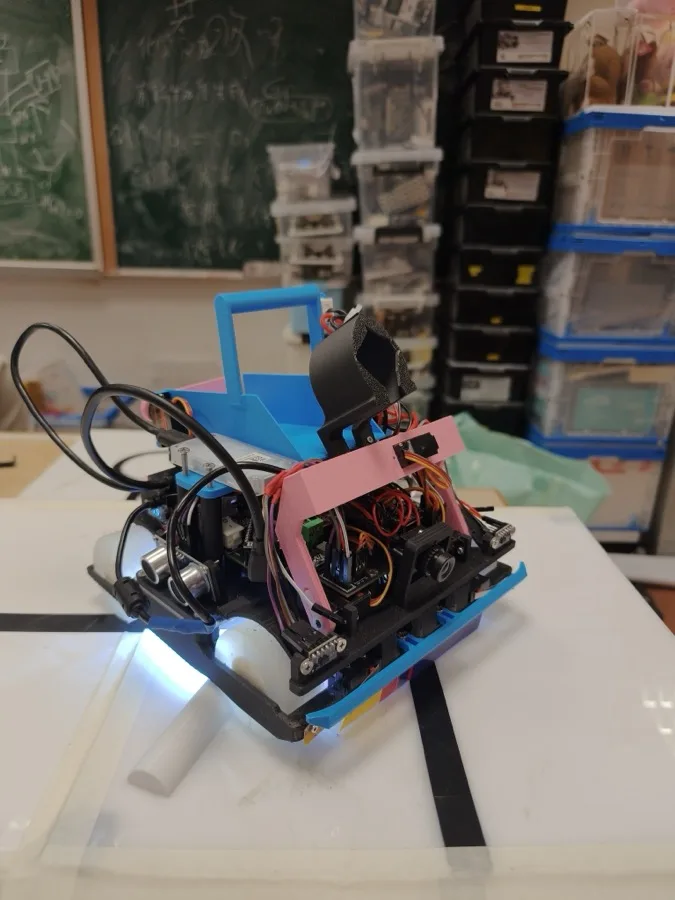
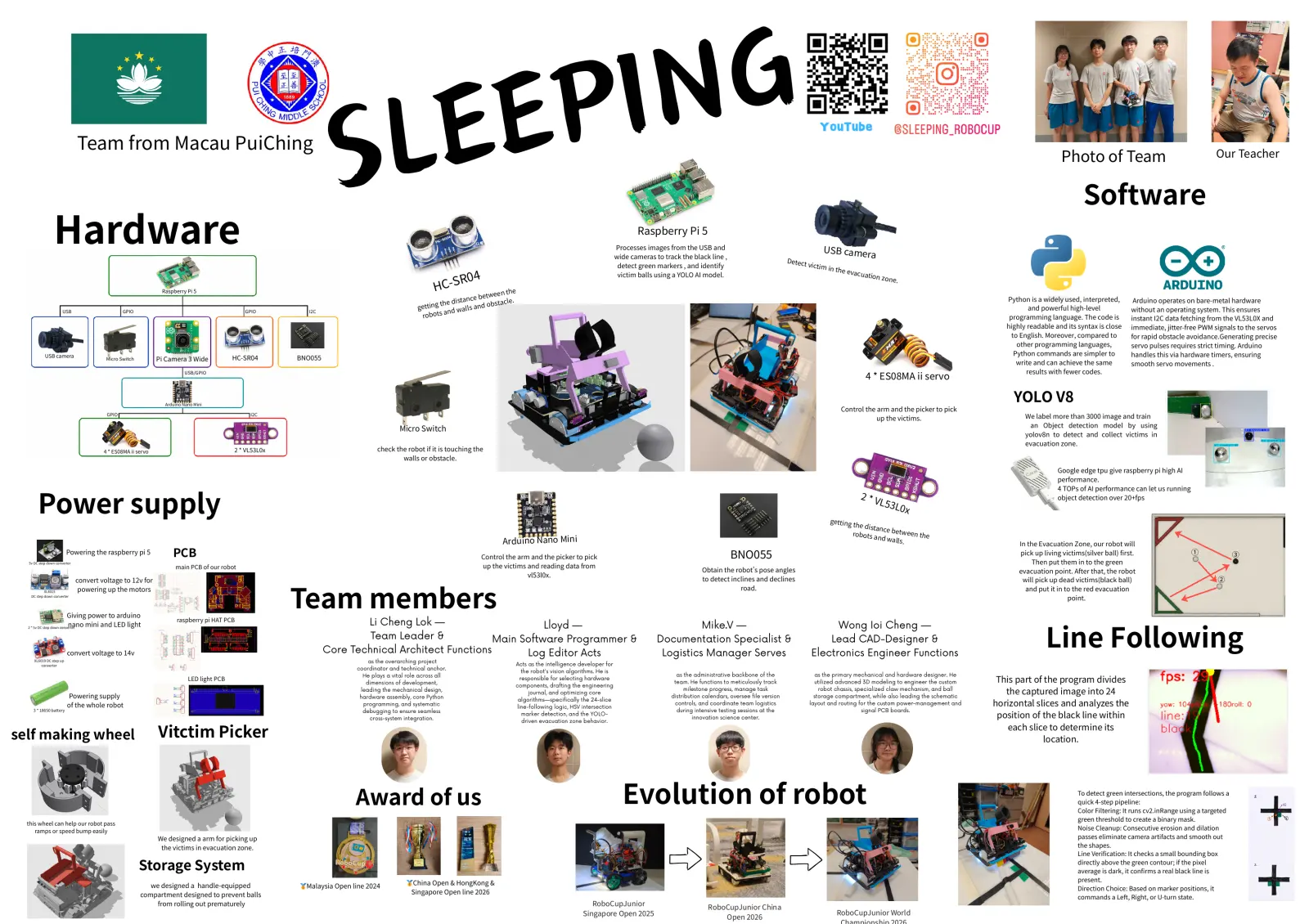
This autonomous rescue robot features a decoupled dual-processor architecture managed by a modular Finite State Machine (FSM). High-level AI, logic branching, and computer vision pipelines run on a Raspberry Pi 5, while an Arduino Nano handles low-level motor and servo claw limits to eliminate structural processing latency.
Poster
Read the text of this document — 834 words
LEEPING
S
YouTube
Team from Macau PuiChing
Photo of Team Our Teacher
Software
Hardware Raspberry Pi 5
Processes images from the USB and
wide cameras to track the black line ,
USB camer
a
Detect
detect green markers , and identify victim
in t h e
04
evacua
victim balls using a YOLO AI model.
R
tion zo
HC-S n e.
e
een th
Raspberry Pi 5
e b e t w
tanc stacle.
Python is a widely used, interpreted, Arduino operates on bare-metal hardware
tt i n g t h e d is n d o b
ge lls a and powerful high-level
USB GPIO GPIO I2C
o b o t s and wa without an operating system. This ensures
r programming language. The code is instant I2C data fetching from the VL53L0X and
highly readable and its syntax is close immediate, jitter-free PWM signals to the servos
to English. Moreover, compared to for rapid obstacle avoidance.Generating precise
other programming languages, servo pulses requires strict timing. Arduino
USB camera Python commands are simpler to handles this via hardware timers, ensuring
Micro Switch Pi Camera 3 Wide HC-SR04 BNO055
write and can achieve the same smooth servo movements .
results with fewer codes.
4 * ES08MA ii servo
USB/GPIO
Arduino Nano Mini
YOLO V8
Control the arm and the picker to pick
GPIO I2C
up the victims. We label more than 3000 image and train
an Object detection model by using
Micro Switch
yolov8n to detect and collect victims in
evacuation zone.
4 * ES08MA ii servo 2 * VL53L0x check the robot if it is touching the
walls or obstacle.
Google edge tpu give raspberry pi high AI
performance.
Power supply
4 TOPs of AI performance can let us running
2*V object detection over 20+fps
L53L
0x
getting
th e distanc
e betwe
robots a en th e
Arduino Nano Mini
nd wall
s. In the Evacuation Zone, our robot will
Powering the raspberry pi 5 PCB Control the arm and the picker to pick BNO055 pick up living victims(silver ball) first. ① ③
5v DC step down converter Then put them in to the green
main PCB of our robot up the victims and reading data from
Obtain the robot's pose angles evacuation point. After that, the robot
vl53l0x.
convert voltage to 12v for to detect inclines and declines will pick up dead victims(black ball) ②
Team members
XL4015 powering up the motors road. and put it in to the red evacuation
DC step down converter
point.
Giving power to arduino
raspberry pi HAT PCB
Line Following
nano mini and LED light
2 * 5v DC step down converter
Li Cheng Lok — Lloyd — Mike.V — Wong Ioi Cheng —
Team Leader & Main Software Programmer & Documentation Specialist & Lead CAD-Designer &
convert voltage to 14v Core Technical Architect Functions Log Editor Acts Logistics Manager Serves Electronics Engineer Functions
XL6019 DC step up as the overarching project
converter Acts as the intelligence developer for
coordinator and technical anchor. the robot's vision algorithms. He is
as the administrative backbone of the as the primary mechanical and hardware designer. He
This part of the program divides
He plays a vital role across all
LED light PCB responsible for selecting hardware
team. He functions to meticulously track utilized advanced 3D modeling to engineer the custom
dimensions of development, components, drafting the engineering
Powering supply
leading the mechanical design, journal, and optimizing core
milestone progress, manage task
distribution calendars, oversee file version
robot chassis, specialized claw mechanism, and ball
storage compartment, while also leading the schematic
the captured image into 24
hardware assembly, core Python
horizontal slices and analyzes the
algorithms—specifically the 24-slice
of the whole robot programming, and systematic line-following logic, HSV intersection
controls, and coordinate team logistics layout and routing for the custom power-management and
3 * 18650 battery during intensive testing sessions at the signal PCB boards.
position of the black line within
debugging to ensure seamless marker detection, and the YOLO-
cross-system integration. innovation science center.
driven evacuation zone behavior.
self making wheel Vitctim Picker each slice to determine its
location.
Award of us Evolution of robot To detect green intersections, the program follows a
quick 4-step pipeline:
Color Filtering: It runs cv2.inRange using a targeted
green threshold to create a binary mask.
this wheel can help our robot pass
ramps or speed bump easily
Noise Cleanup: Consecutive erosion and dilation
We designed a arm for picking up passes eliminate camera artifacts and smooth out
the victims in evacuation zone. the shapes.
Line Verification: It checks a small bounding box
Storage System directly above the green contour; if the pixel
average is dark, it confirms a real black line is
we designed a handle-equipped 🥇Malaysia Open line 2024 🥇China Open & HongKong & present.
Direction Choice: Based on marker positions, it
compartment designed to prevent balls Singapore Open line 2026
commands a Left, Right, or U-turn state.
from rolling out prematurely RoboCupJunior
RoboCupJunior China
Singapore Open 2025 RoboCupJunior World
Open 2026
1 page, rendered as images so they load quickly. The text above is the document's own, extracted from the PDF.
Presentation video
Hosted on YouTube. The player loads only when you press play.
Bill of materials
Shown as the original PDF, because this one is smaller that way and its text stays selectable and searchable.
Engineering journal
Show the remaining 38 pages

Read the text of this document — 2680 words
Engineering Journal (Log)
Team : Sleeping
Participating unit: Macau Pui Ching Middle School
Team member:
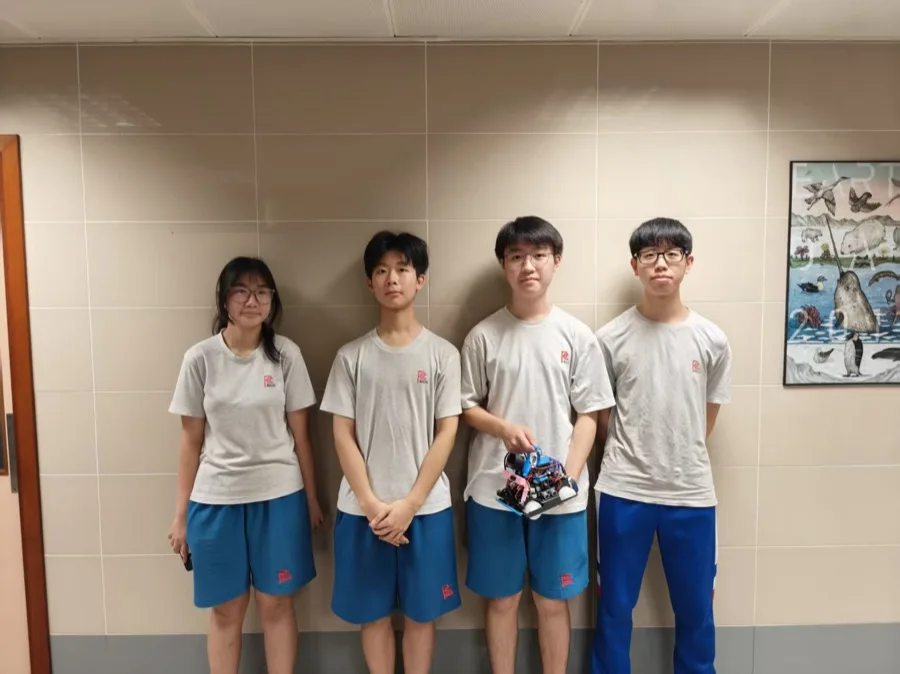
Li Cheng Lok, Lloyd, Mike.V, Wong Ioi Cheng
Date of creation: 14th February,2026
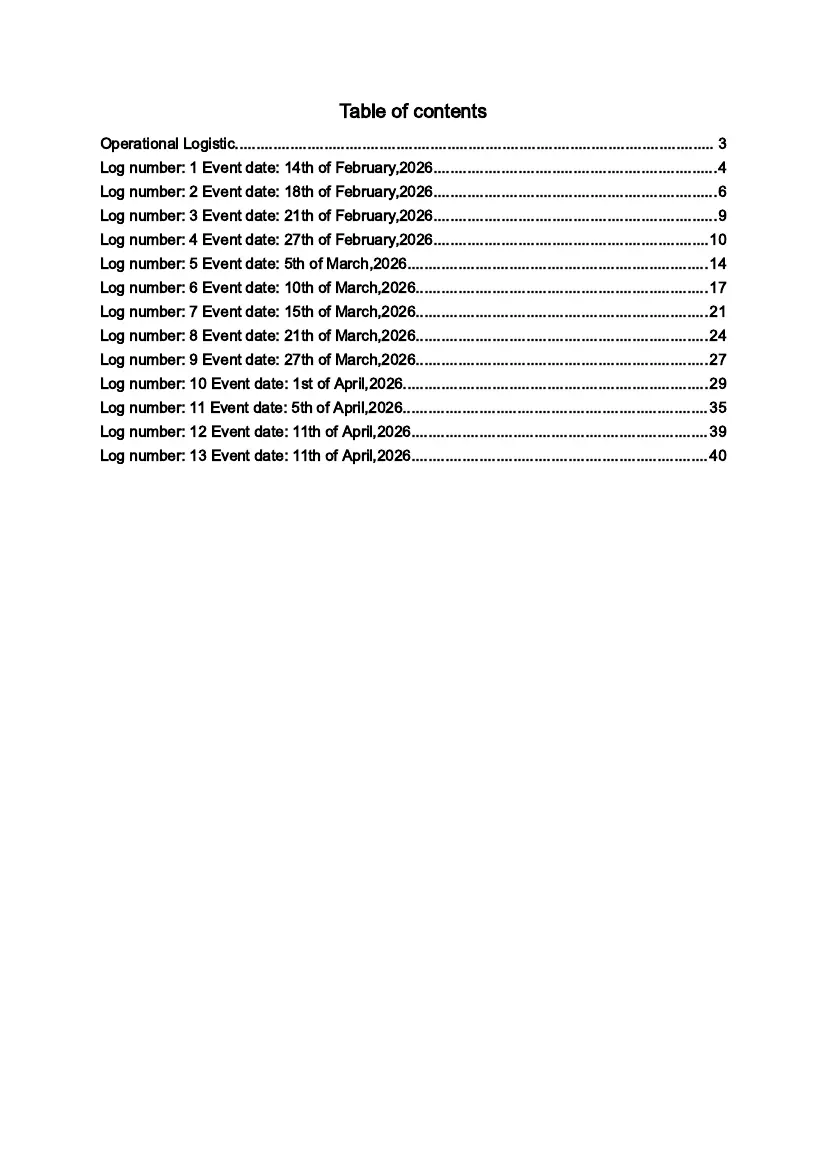
Table of contents
Operational Logistic................................................................................................................. 3
Log number: 1 Event date: 14th of February,2026...................................................................4
Log number: 2 Event date: 18th of February,2026...................................................................6
Log number: 3 Event date: 21th of February,2026...................................................................9
Log number: 4 Event date: 27th of February,2026.................................................................10
Log number: 5 Event date: 5th of March,2026.......................................................................14
Log number: 6 Event date: 10th of March,2026.....................................................................17
Log number: 7 Event date: 15th of March,2026.....................................................................21
Log number: 8 Event date: 21th of March,2026.....................................................................24
Log number: 9 Event date: 27th of March,2026.....................................................................27
Log number: 10 Event date: 1st of April,2026........................................................................29
Log number: 11 Event date: 5th of April,2026........................................................................35
Log number: 12 Event date: 11th of April,2026......................................................................39
Log number: 13 Event date: 11th of April,2026......................................................................40
Operational Logistic
● Means of communication:
○ Verbal communication: Our team can communicate verbally and discuss
ideas, opinions, and facts by having conversations between members. It 1s
among the easiest and most efficient methods for several people to work
together productively in a group. Each member of our team is tasked with
Overseeing several project areas through verbal communication.
● Meeting frequency:
○ We as a team agreed to have three weekly meetings. Meeting every day
would make time more compact because we still have to go to school. If we
had to maintain our concentration on both our project and our academic
responsibilities, we would not be able to guarantee our productivity. As a
result, our team thinks that meeting three times a week is the most effective
way to handle our workload.
● Location:
○ Macau Pul Ching Secondary School Innovation Science and Education
Center (Fablab): We are able to access a wide range of components in the
laboratory because of the diversity of supplements. Not to add, Fablab offers
an adequate and comfortable envirouent for us to debug our program and
robot. In order to maintain the integrity of the work, educators working in the
laboratory can also offer suggestions for our project.
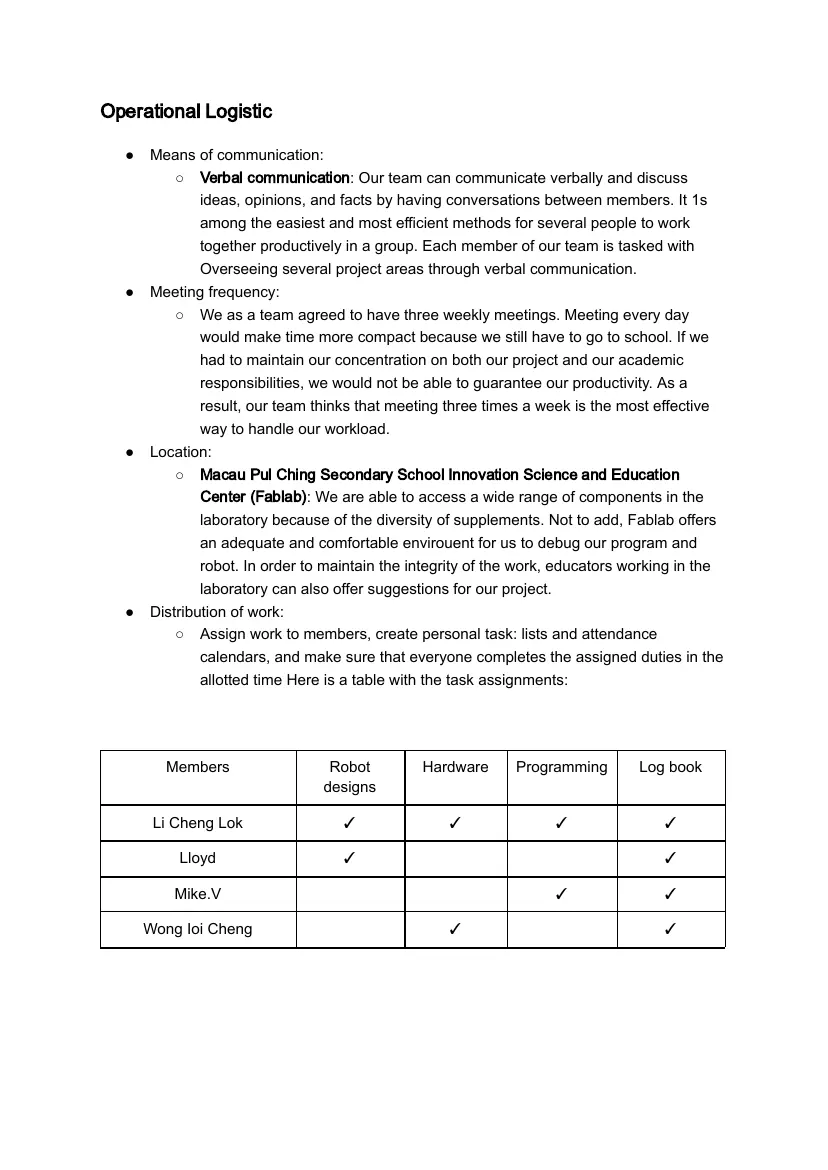
● Distribution of work:
○ Assign work to members, create personal task: lists and attendance
calendars, and make sure that everyone completes the assigned duties in the
allotted time Here is a table with the task assignments:
Members Robot Hardware Programming Log book
designs
Li Cheng Lok ✓ ✓ ✓ ✓
Lloyd ✓ ✓
Mike.V ✓ ✓
Wong Ioi Cheng ✓ ✓
Log number: 1 Event date: 14th of February,2026
Members attended: Li Cheng Lok, Lloyd, Mike.V, Wong Ioi Cheng
Editor: Lloyd
Location: Macau Pui Ching Secondary School Innovation Science and Education
Center
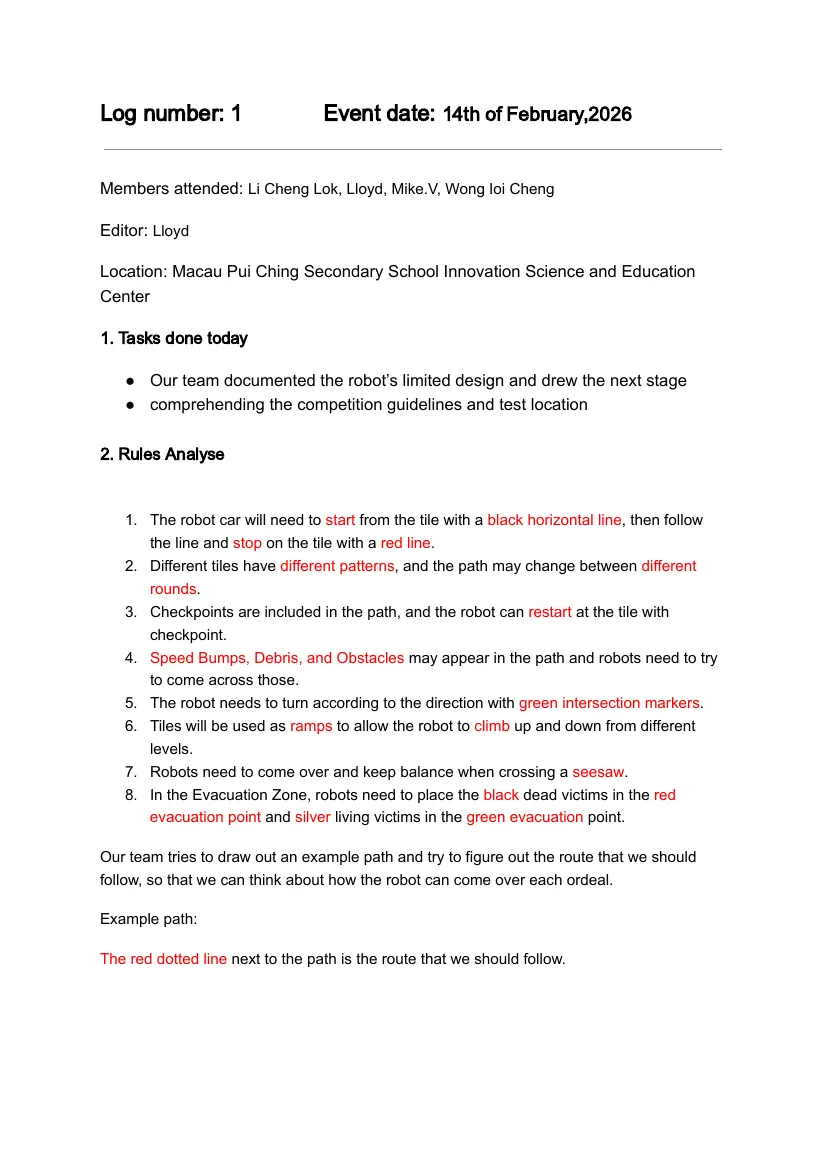
1. Tasks done today
● Our team documented the robot’s limited design and drew the next stage
● comprehending the competition guidelines and test location
2. Rules Analyse
1. The robot car will need to start from the tile with a black horizontal line, then follow
the line and stop on the tile with a red line.
2. Different tiles have different patterns, and the path may change between different
rounds.
3. Checkpoints are included in the path, and the robot can restart at the tile with
checkpoint.
4. Speed Bumps, Debris, and Obstacles may appear in the path and robots need to try
to come across those.
5. The robot needs to turn according to the direction with green intersection markers.
6. Tiles will be used as ramps to allow the robot to climb up and down from different
levels.
7. Robots need to come over and keep balance when crossing a seesaw.
8. In the Evacuation Zone, robots need to place the black dead victims in the red
evacuation point and silver living victims in the green evacuation point.
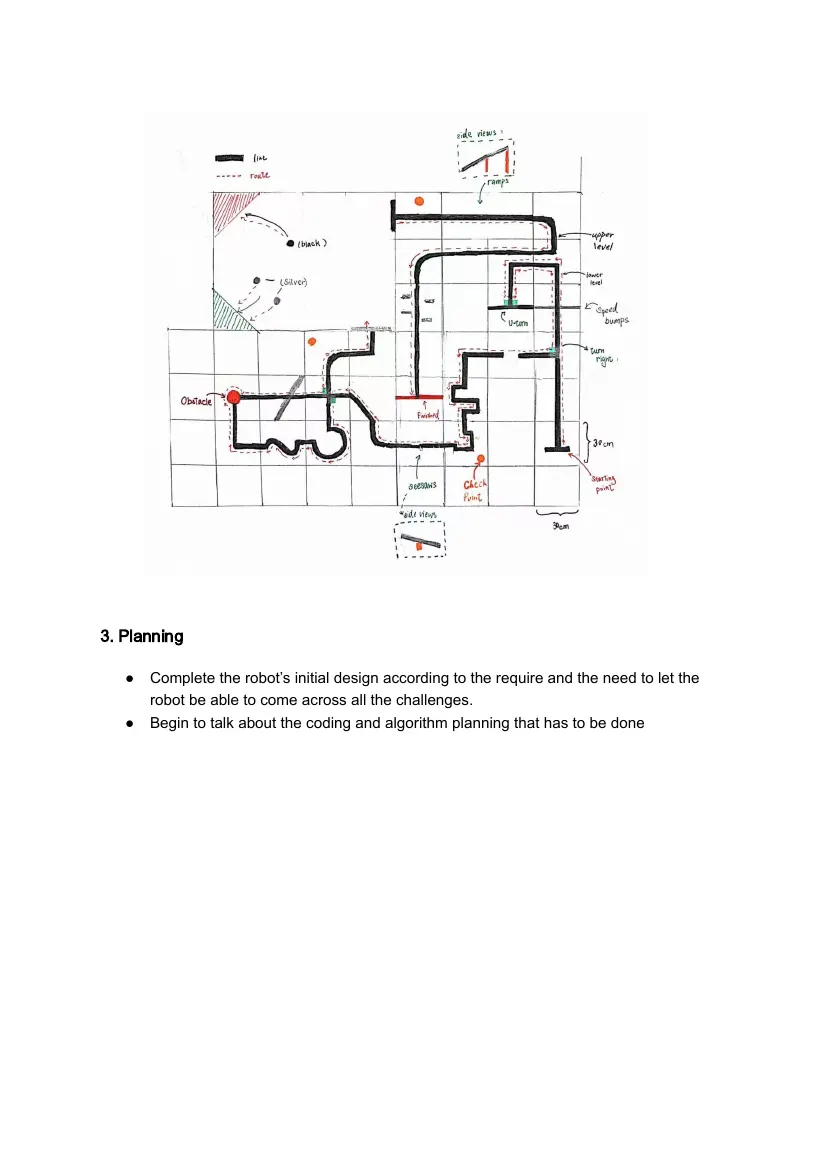
Our team tries to draw out an example path and try to figure out the route that we should
follow, so that we can think about how the robot can come over each ordeal.
Example path:
The red dotted line next to the path is the route that we should follow.
3. Planning
● Complete the robot’s initial design according to the require and the need to let the
robot be able to come across all the challenges.
● Begin to talk about the coding and algorithm planning that has to be done
Log number: 2 Event date: 18th of February,2026
Members attended: Li Cheng Lok, Lloyd, Mike.V, Wong Ioi Cheng
Editor: Lloyd
Location: Macau Pui Ching Secondary School Innovation Science and Education
Center
1. Tasks done today
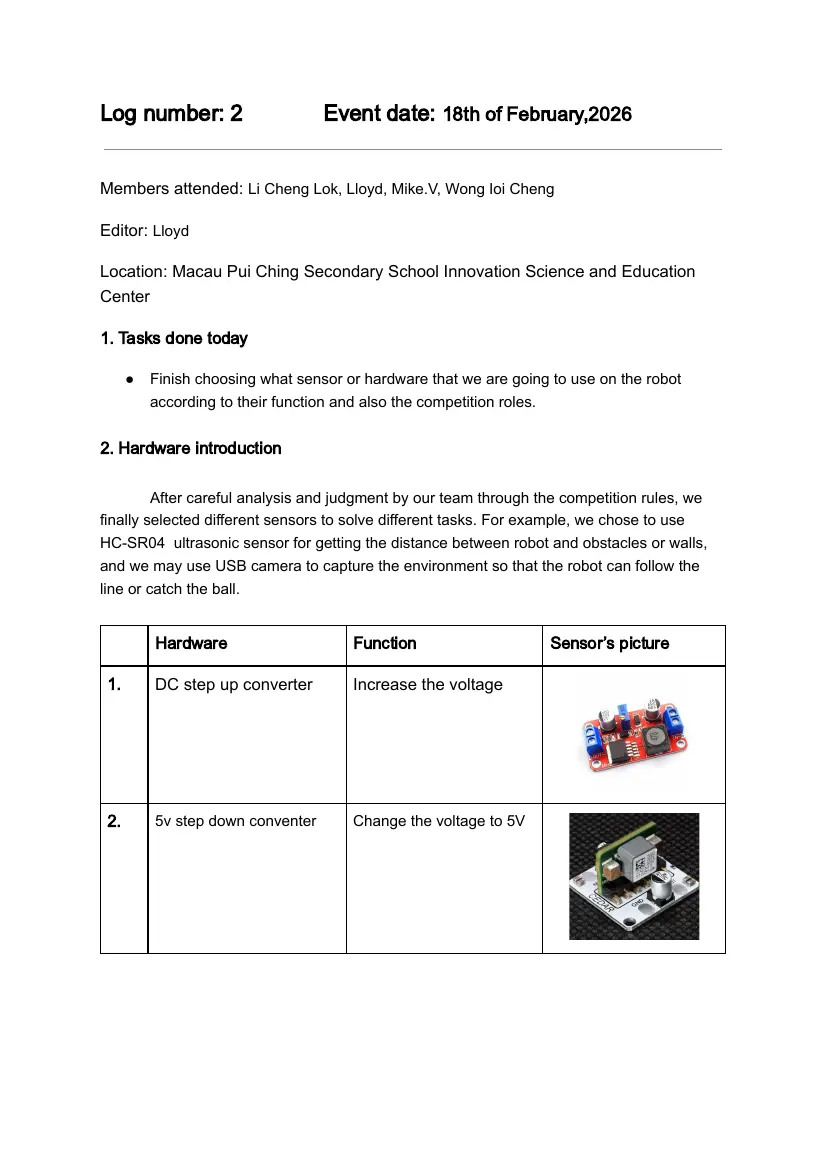
● Finish choosing what sensor or hardware that we are going to use on the robot
according to their function and also the competition roles.
2. Hardware introduction
After careful analysis and judgment by our team through the competition rules, we
finally selected different sensors to solve different tasks. For example, we chose to use
HC-SR04 ultrasonic sensor for getting the distance between robot and obstacles or walls,
and we may use USB camera to capture the environment so that the robot can follow the
line or catch the ball.
Hardware Function Sensor’s picture
1. DC step up converter Increase the voltage
2. 5v step down conventer Change the voltage to 5V
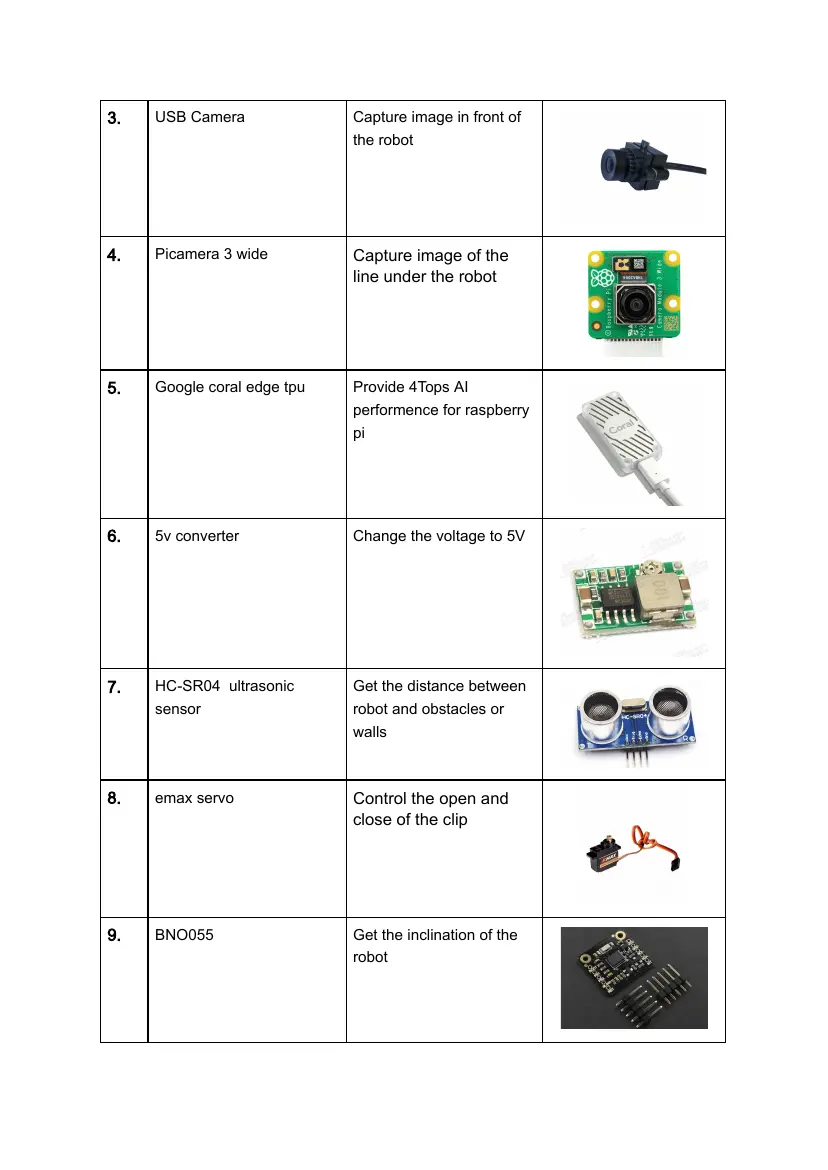
3. USB Camera Capture image in front of
the robot
4. Picamera 3 wide Capture image of the
line under the robot
5. Google coral edge tpu Provide 4Tops AI
performence for raspberry
pi
6. 5v converter Change the voltage to 5V
7. HC-SR04 ultrasonic Get the distance between
sensor robot and obstacles or
walls
8. emax servo Control the open and
close of the clip
9. BNO055 Get the inclination of the
robot
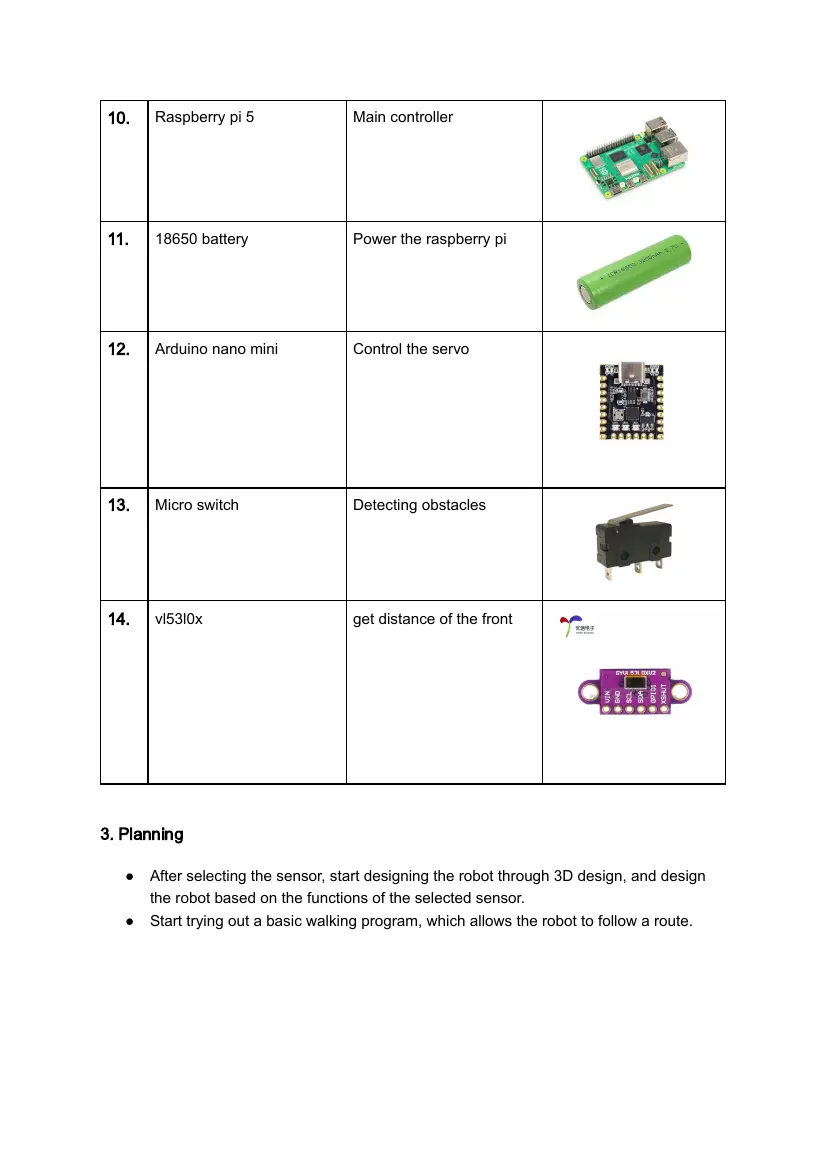
10. Raspberry pi 5 Main controller
11. 18650 battery Power the raspberry pi
12. Arduino nano mini Control the servo
13. Micro switch Detecting obstacles
14. vl53l0x get distance of the front
3. Planning
● After selecting the sensor, start designing the robot through 3D design, and design
the robot based on the functions of the selected sensor.
● Start trying out a basic walking program, which allows the robot to follow a route.
Log number: 3 Event date: 21th of February,2026
Members attended: Li Cheng Lok, Lloyd, Mike.V, Wong Ioi Cheng
Editor: Lloyd
Location: Macau Pui Ching Secondary School Innovation Science and Education
Center
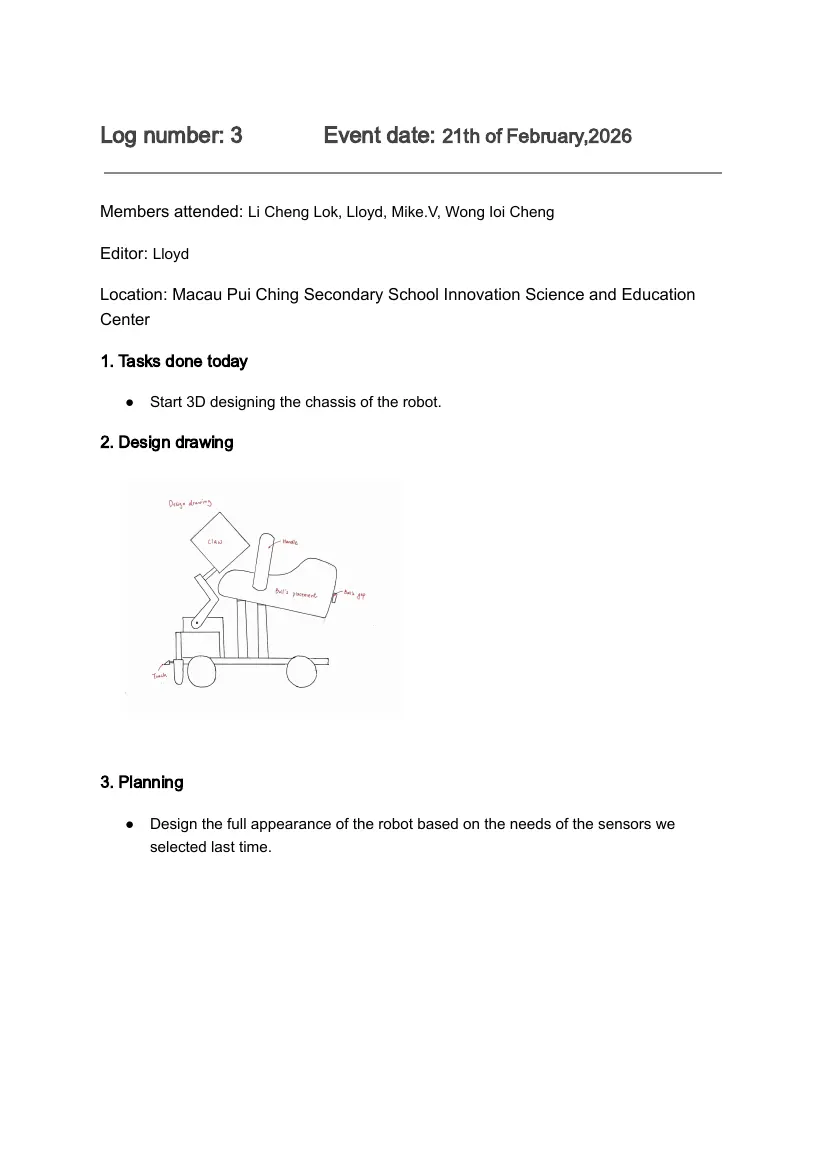
1. Tasks done today
● Start 3D designing the chassis of the robot.
2. Design drawing
3. Planning
● Design the full appearance of the robot based on the needs of the sensors we
selected last time.
Log number: 4 Event date: 27th of February,2026
Members attended: Li Cheng Lok, Lloyd, Mike.V, Wong Ioi Cheng
Editor: Lloyd
Location: Macau Pui Ching Secondary School Innovation Science and Education
Center
1. Tasks done today
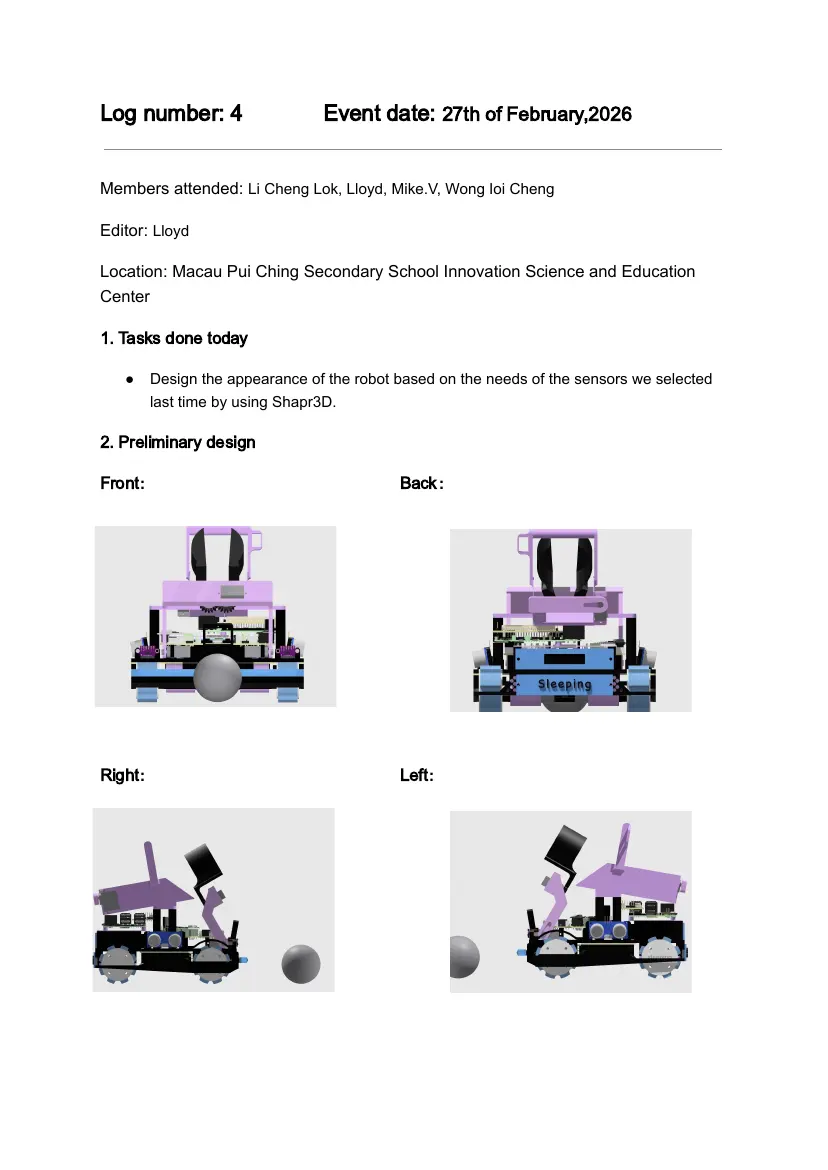
● Design the appearance of the robot based on the needs of the sensors we selected
last time by using Shapr3D.
2. Preliminary design
Front: Back:
Right: Left:
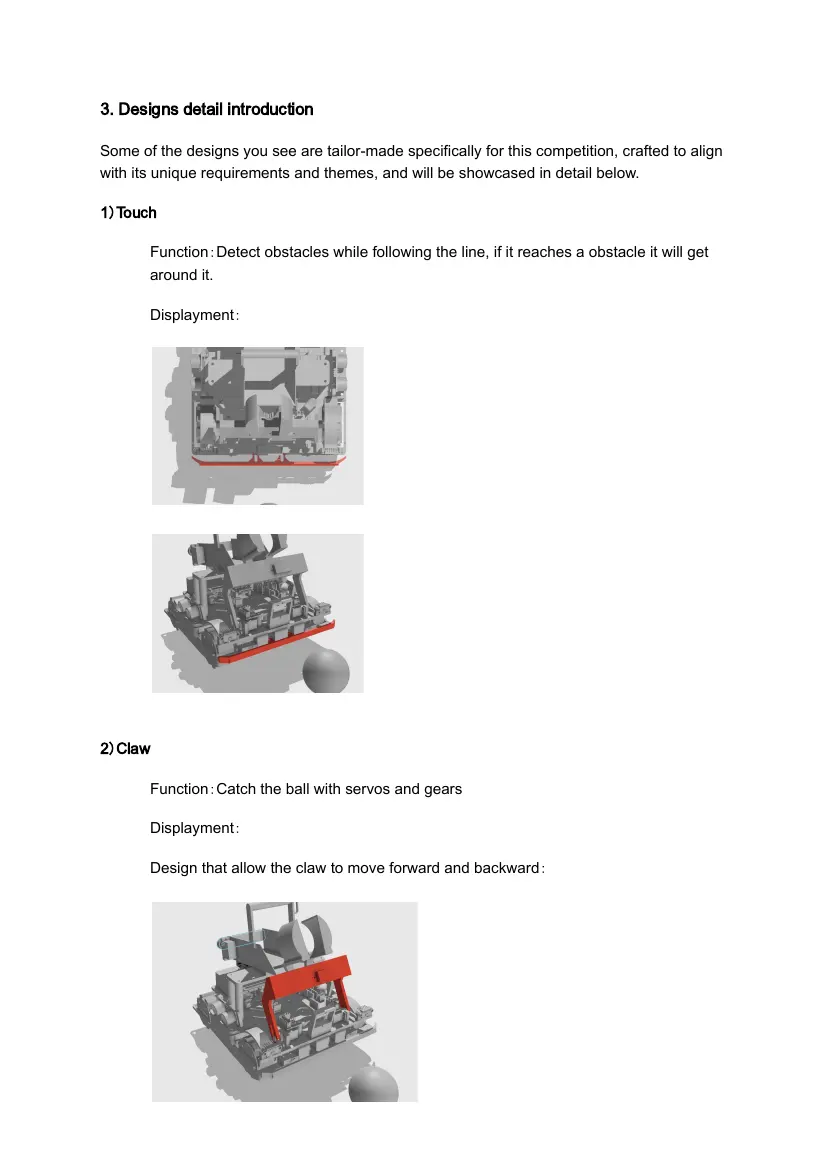
3. Designs detail introduction
Some of the designs you see are tailor-made specifically for this competition, crafted to align
with its unique requirements and themes, and will be showcased in detail below.
1)Touch
Function:Detect obstacles while following the line, if it reaches a obstacle it will get
around it.
Displayment:
2)Claw
Function:Catch the ball with servos and gears
Displayment:
Design that allow the claw to move forward and backward:
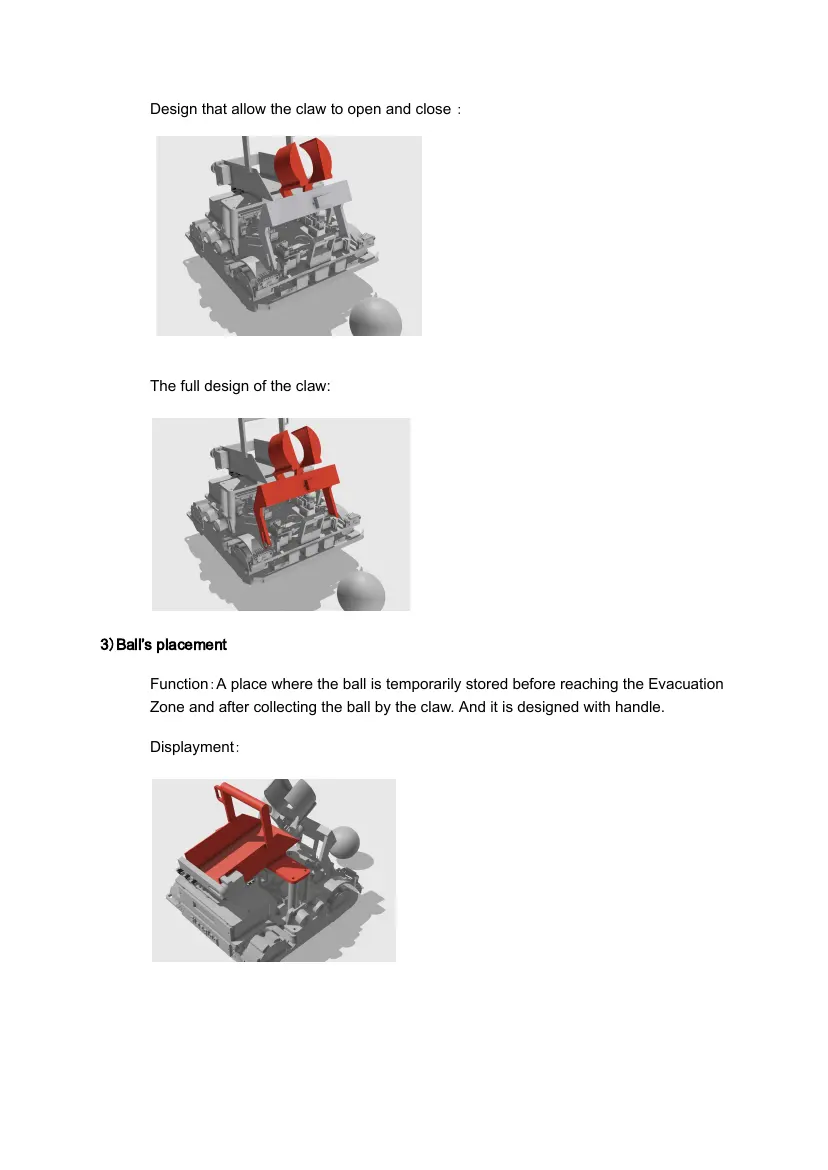
Design that allow the claw to open and close :
The full design of the claw:
3)Ball’s placement
Function:A place where the ball is temporarily stored before reaching the Evacuation
Zone and after collecting the ball by the claw. And it is designed with handle.
Displayment:
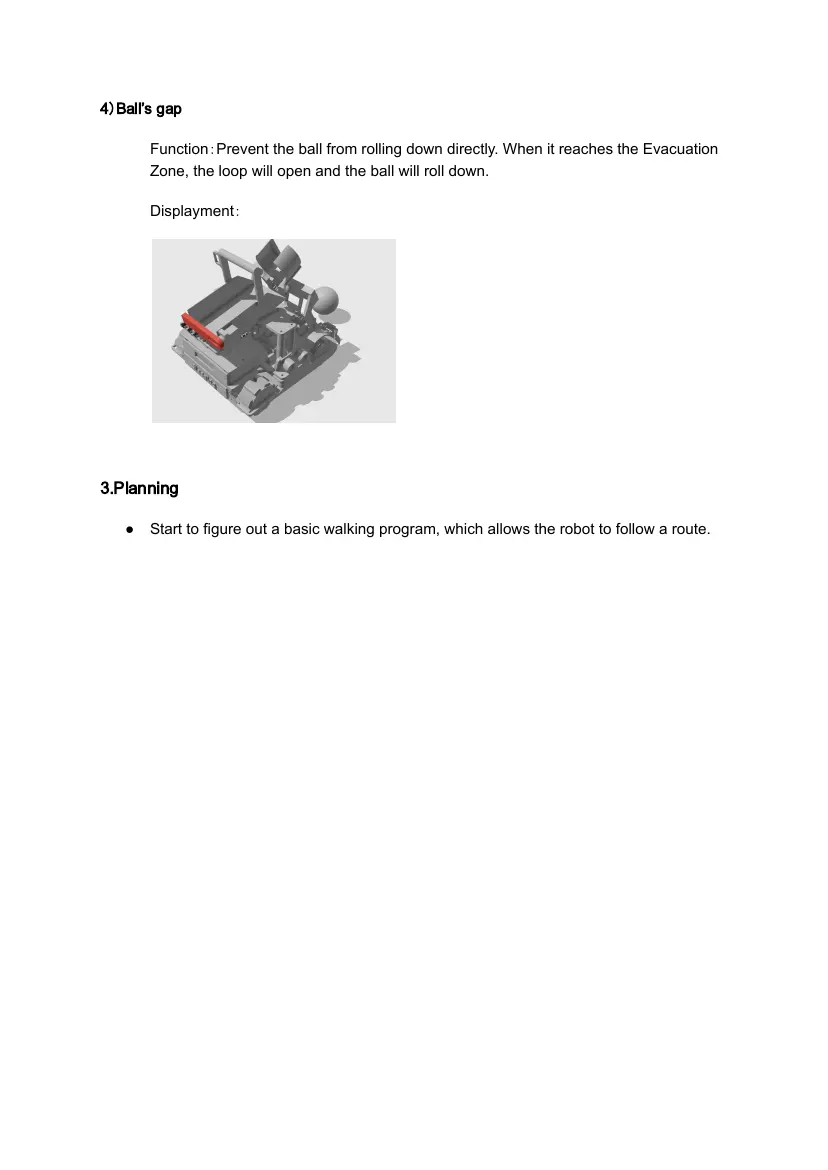
4)Ball’s gap
Function:Prevent the ball from rolling down directly. When it reaches the Evacuation
Zone, the loop will open and the ball will roll down.
Displayment:
3.Planning
● Start to figure out a basic walking program, which allows the robot to follow a route.
Log number: 5 Event date: 5th of March,2026
Members attended: Li Cheng Lok, Lloyd, Mike.V, Wong Ioi Cheng
Editor: Wong Ioi Cheng
Location: Macau Pui Ching Secondary School Innovation Science and Education
Center
1.Tasks done today
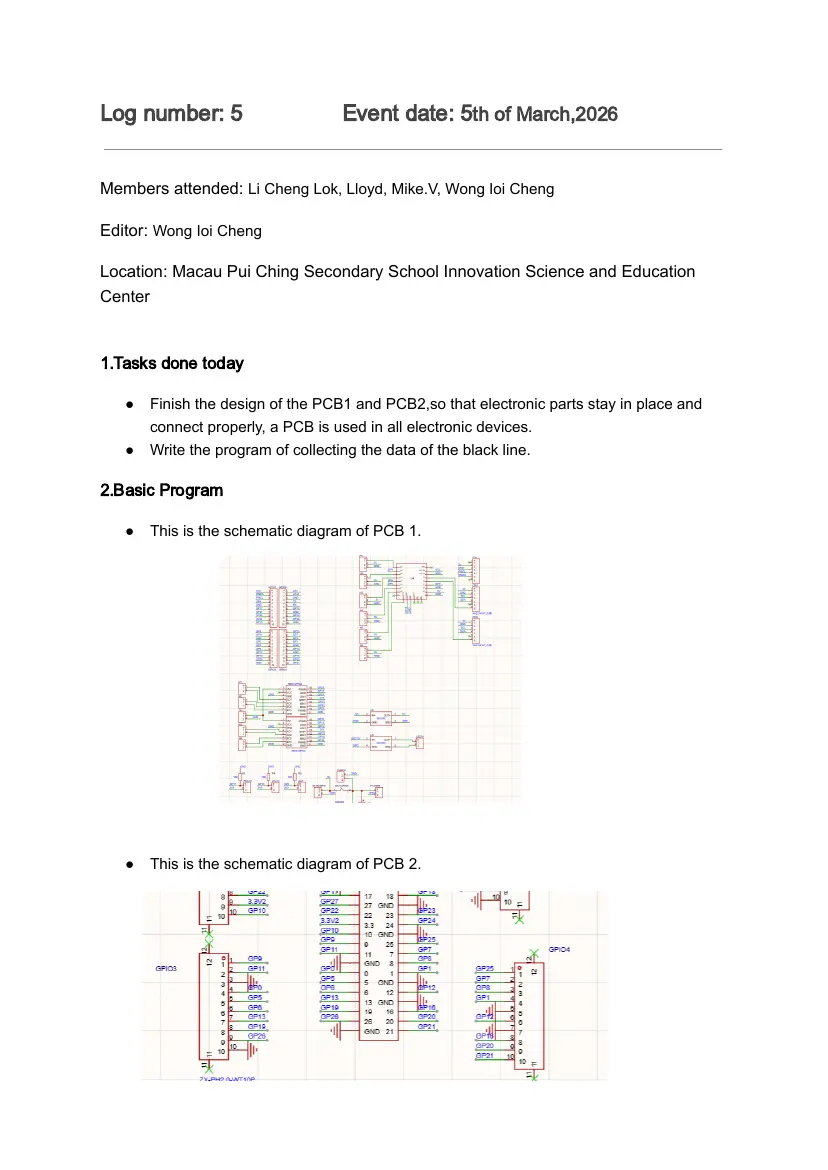
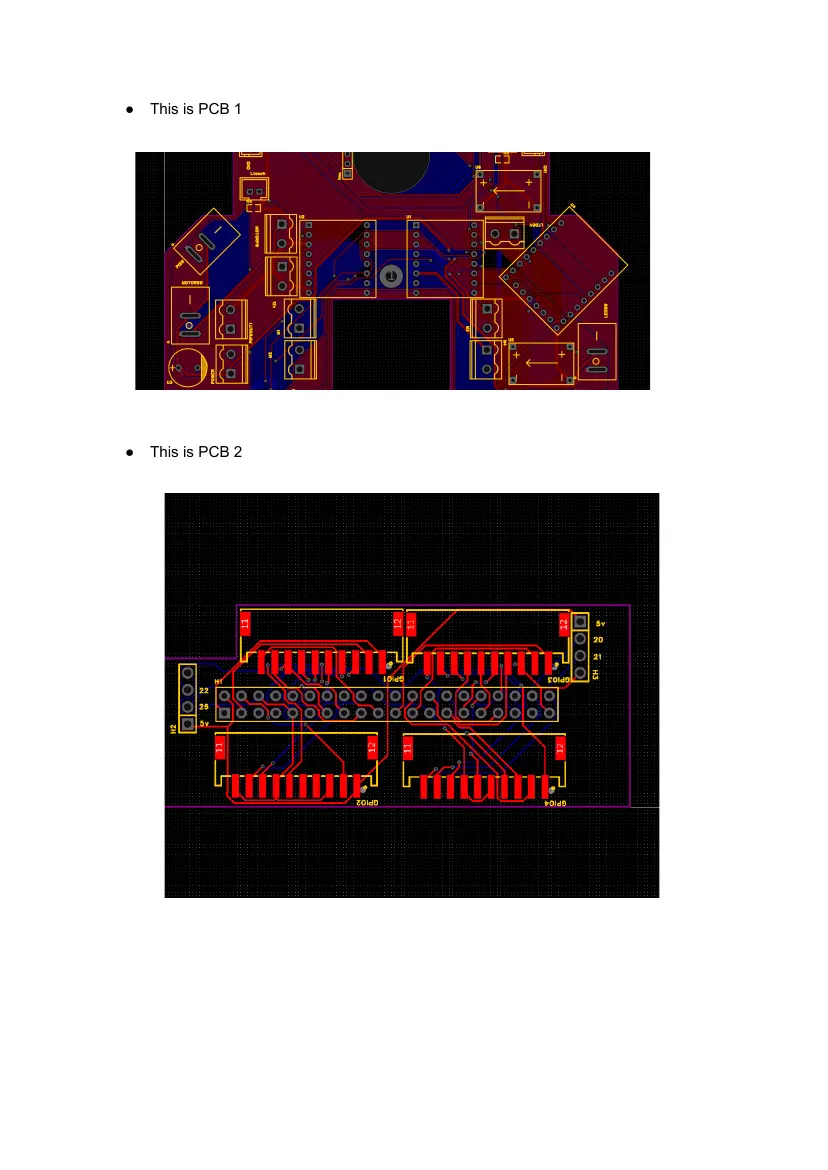
● Finish the design of the PCB1 and PCB2,so that electronic parts stay in place and
connect properly, a PCB is used in all electronic devices.
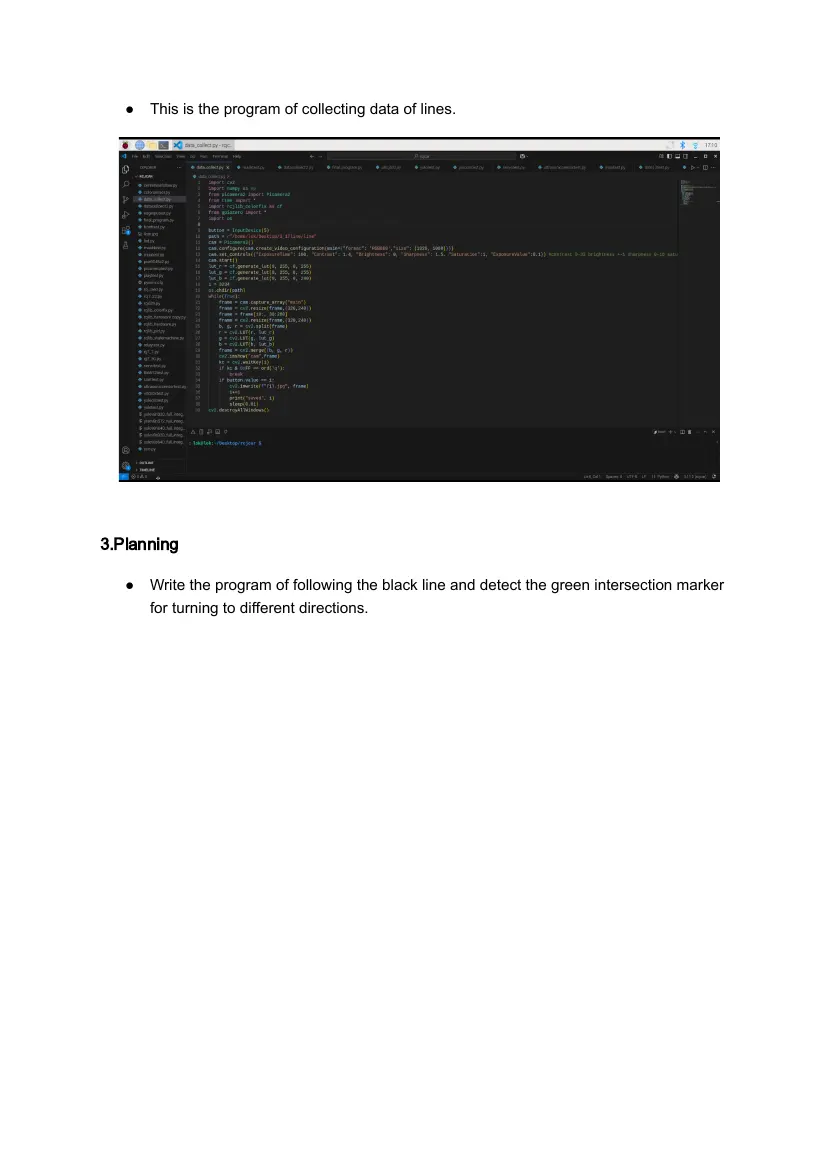
● Write the program of collecting the data of the black line.
2.Basic Program
● This is the schematic diagram of PCB 1.
● This is the schematic diagram of PCB 2.
● This is PCB 1
● This is PCB 2
● This is the program of collecting data of lines.
3.Planning
● Write the program of following the black line and detect the green intersection marker
for turning to different directions.
Log number: 6 Event date: 10th of March,2026
Members attended: Li Cheng Lok, Lloyd, Mike.V, Wong Ioi Cheng
Editor: Lloyd
Location: Macau Pui Ching Secondary School Innovation Science and Education
Center
1. Tasks done today
● Write the program of following the black line and detect the green intersection marker
for turning to different directions.
● Test the program.
2. Basic Program
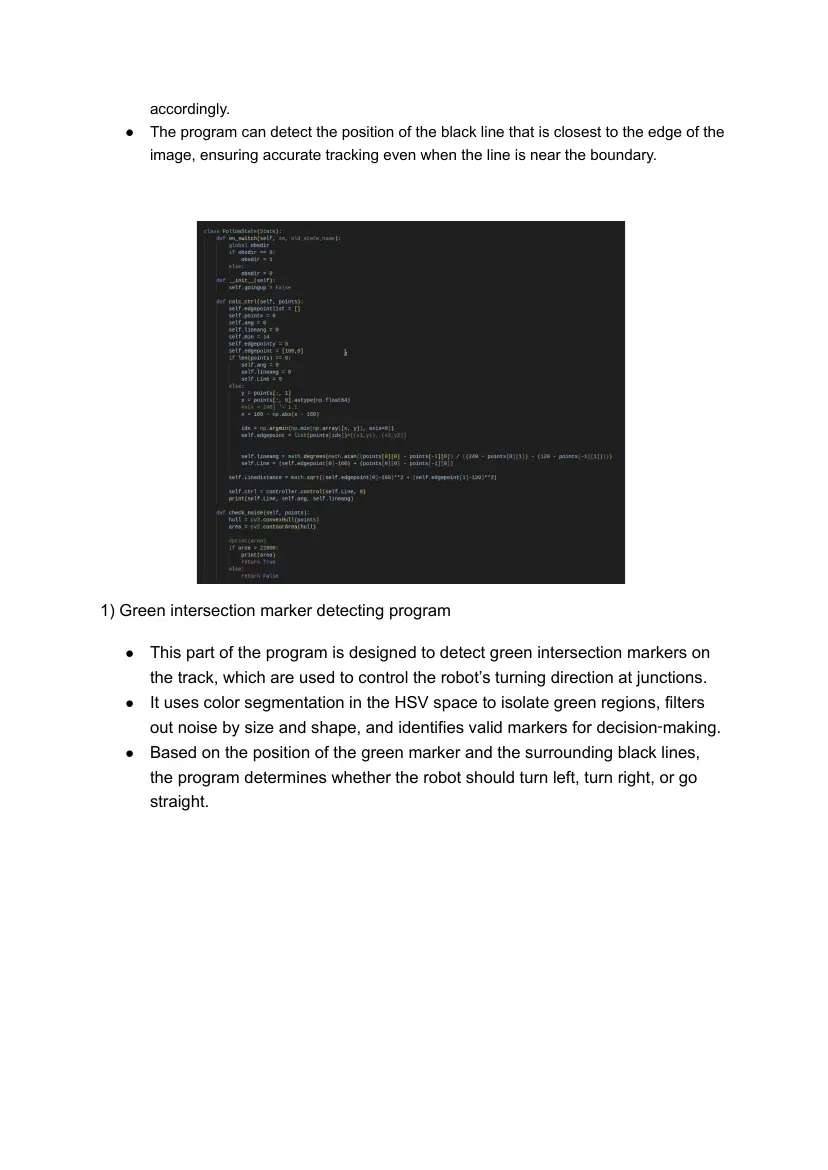
1) Line following program
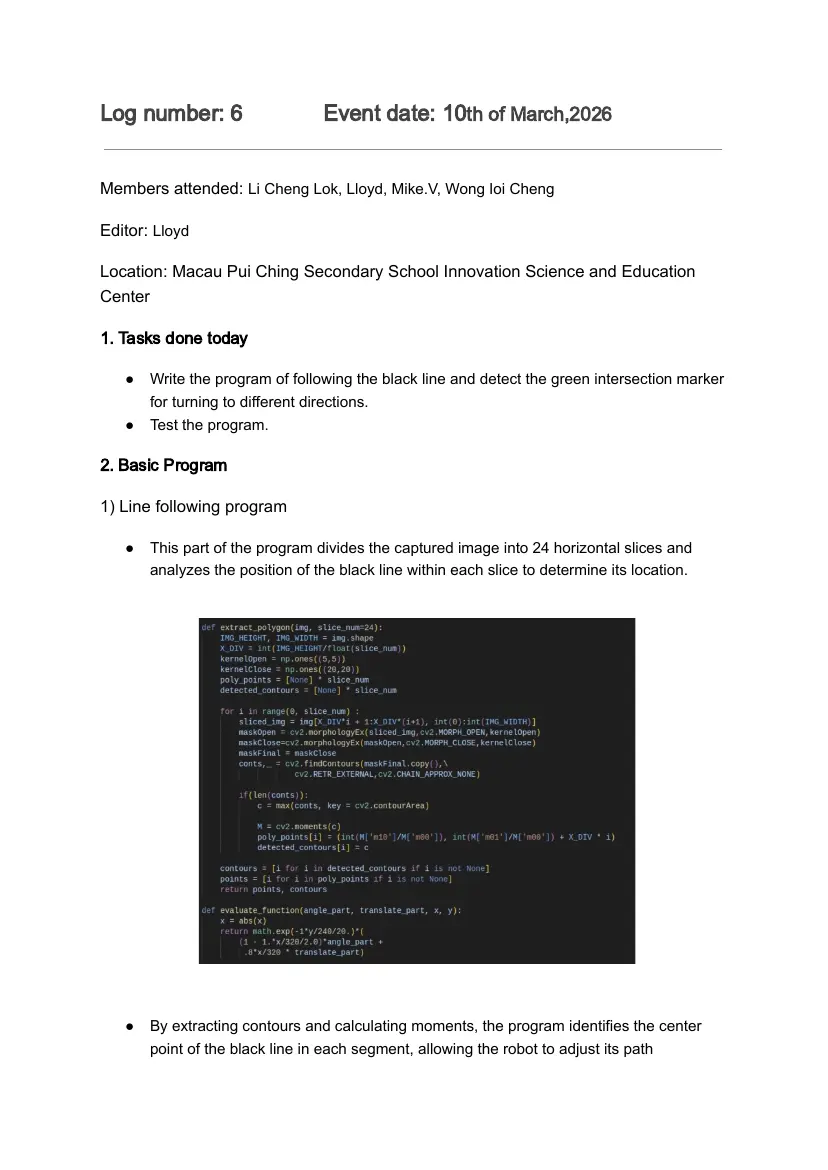
● This part of the program divides the captured image into 24 horizontal slices and
analyzes the position of the black line within each slice to determine its location.
● By extracting contours and calculating moments, the program identifies the center
point of the black line in each segment, allowing the robot to adjust its path
accordingly.
● The program can detect the position of the black line that is closest to the edge of the
image, ensuring accurate tracking even when the line is near the boundary.
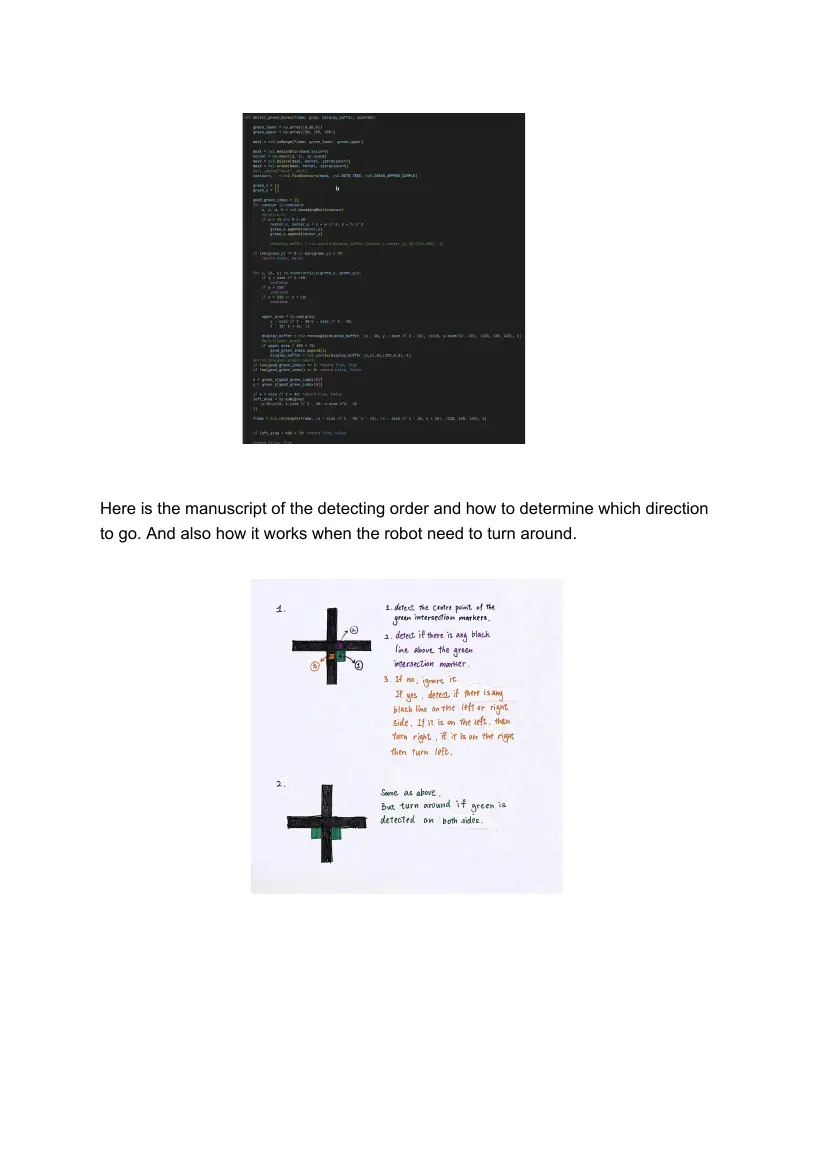
1) Green intersection marker detecting program
● This part of the program is designed to detect green intersection markers on
the track, which are used to control the robot’s turning direction at junctions.
● It uses color segmentation in the HSV space to isolate green regions, filters
out noise by size and shape, and identifies valid markers for decision‑making.
● Based on the position of the green marker and the surrounding black lines,
the program determines whether the robot should turn left, turn right, or go
straight.
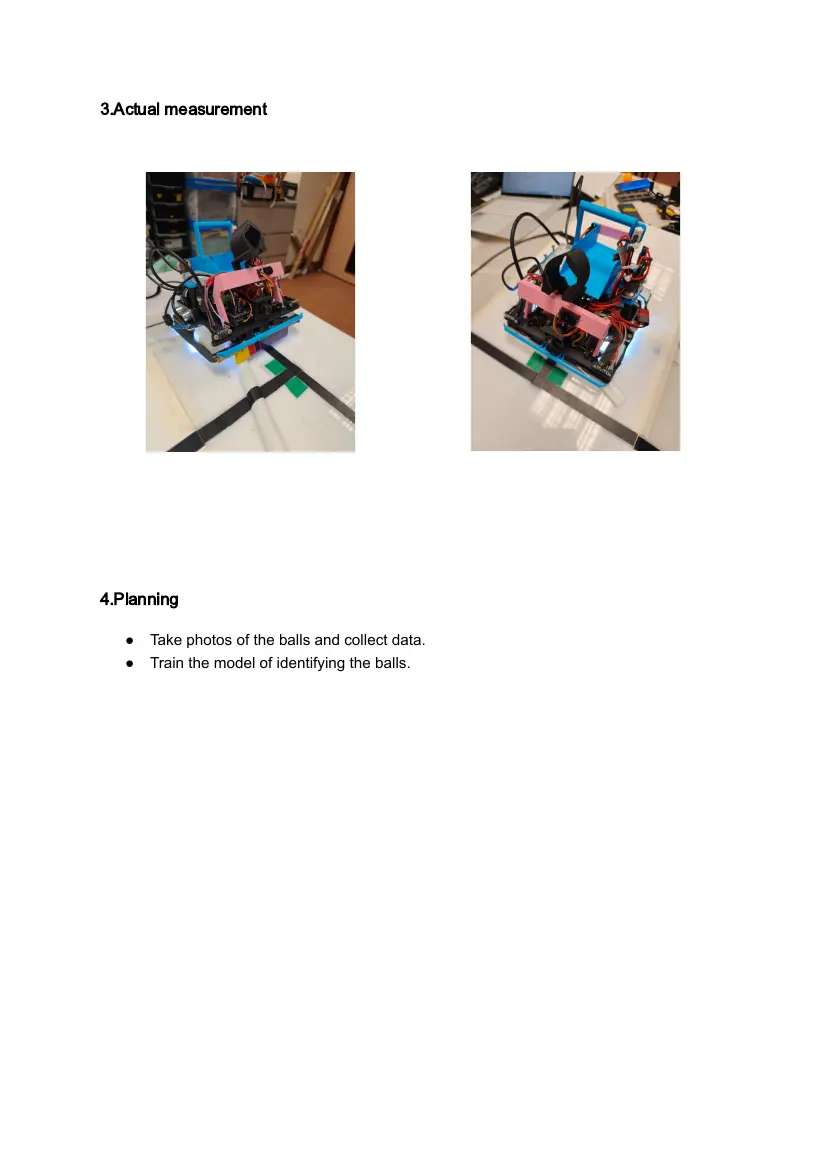
Here is the manuscript of the detecting order and how to determine which direction
to go. And also how it works when the robot need to turn around.
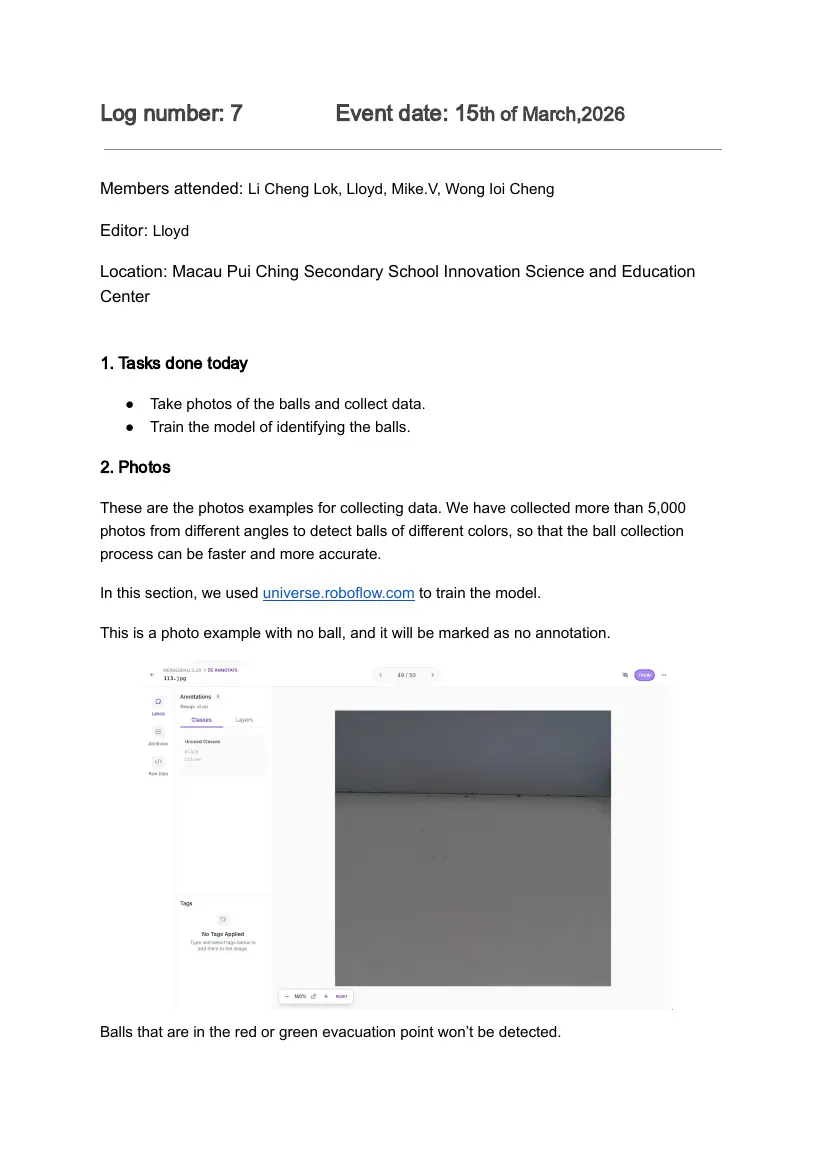
3.Actual measurement
4.Planning
● Take photos of the balls and collect data.
● Train the model of identifying the balls.
Log number: 7 Event date: 15th of March,2026
Members attended: Li Cheng Lok, Lloyd, Mike.V, Wong Ioi Cheng
Editor: Lloyd
Location: Macau Pui Ching Secondary School Innovation Science and Education
Center
1. Tasks done today
● Take photos of the balls and collect data.
● Train the model of identifying the balls.
2. Photos
These are the photos examples for collecting data. We have collected more than 5,000
photos from different angles to detect balls of different colors, so that the ball collection
process can be faster and more accurate.
In this section, we used universe.roboflow.com to train the model.
This is a photo example with no ball, and it will be marked as no annotation.
Balls that are in the red or green evacuation point won’t be detected.
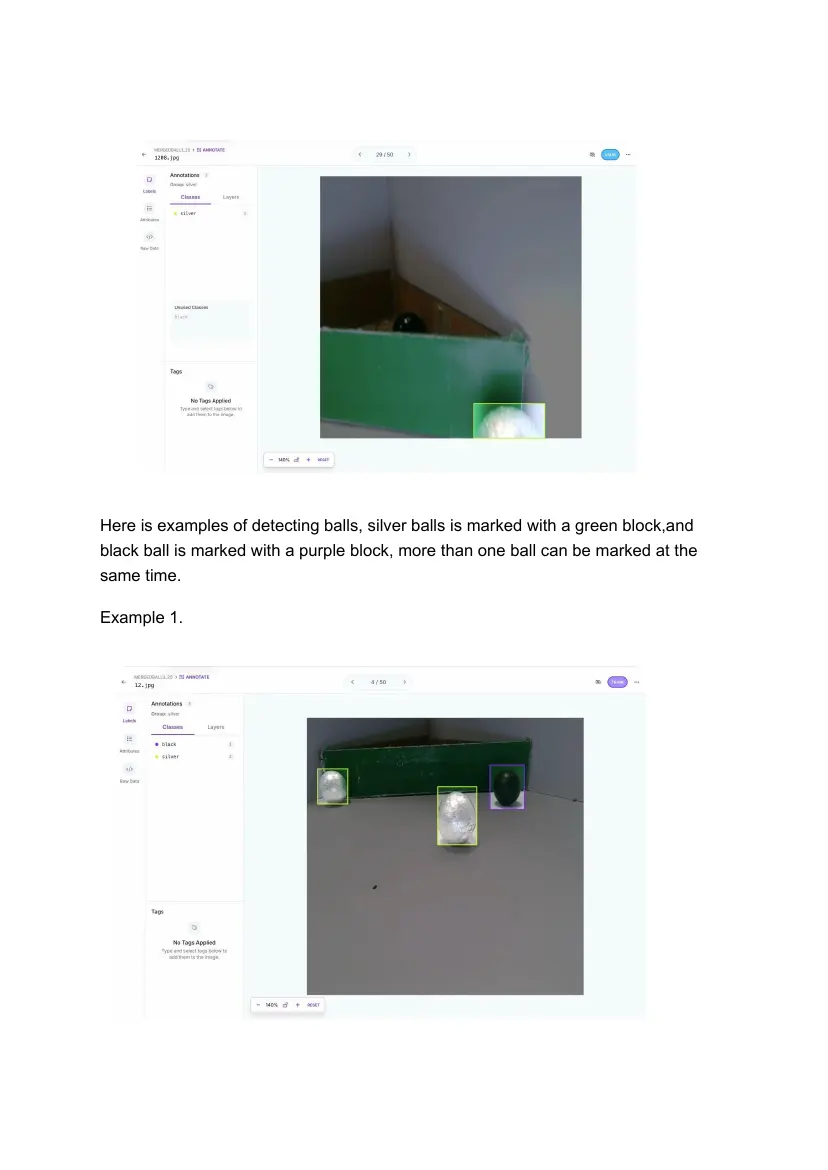
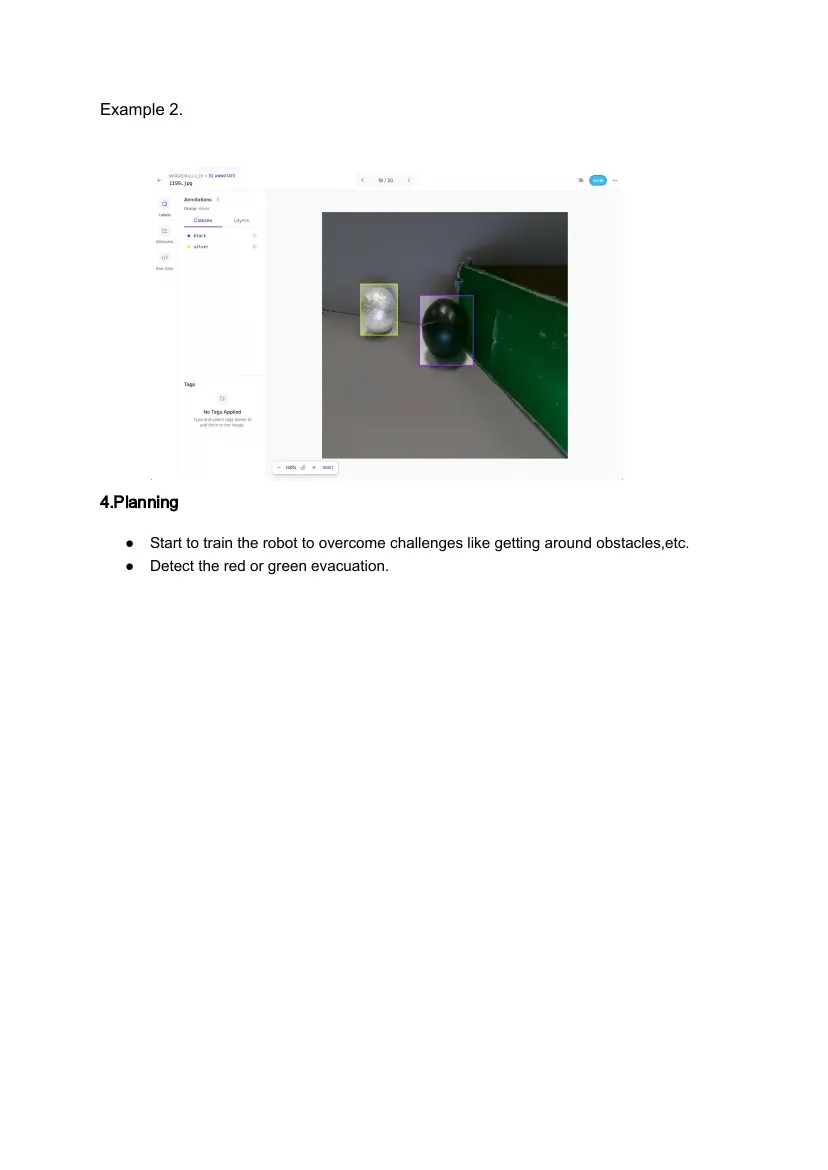
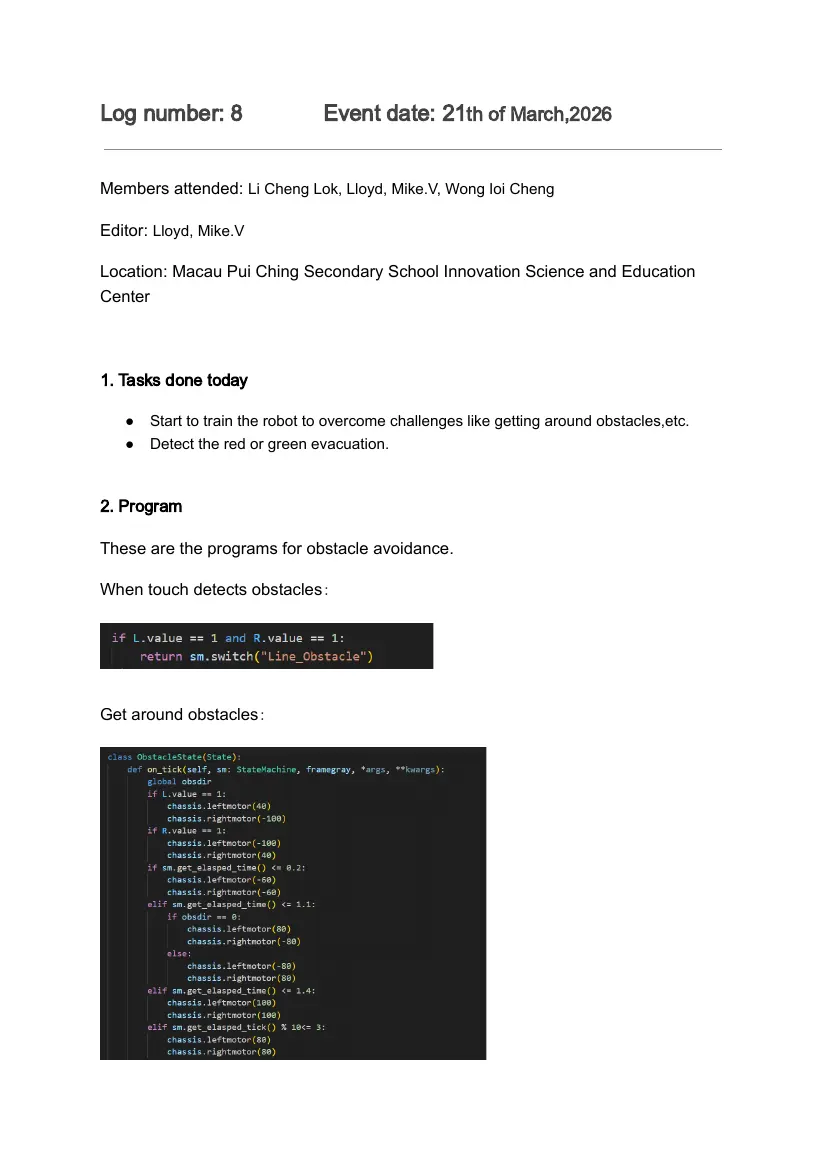
Here is examples of detecting balls, silver balls is marked with a green block,and
black ball is marked with a purple block, more than one ball can be marked at the
same time.
Example 1.
Example 2.
4.Planning
● Start to train the robot to overcome challenges like getting around obstacles,etc.
● Detect the red or green evacuation.
Log number: 8 Event date: 21th of March,2026
Members attended: Li Cheng Lok, Lloyd, Mike.V, Wong Ioi Cheng
Editor: Lloyd, Mike.V
Location: Macau Pui Ching Secondary School Innovation Science and Education
Center
1. Tasks done today
● Start to train the robot to overcome challenges like getting around obstacles,etc.
● Detect the red or green evacuation.
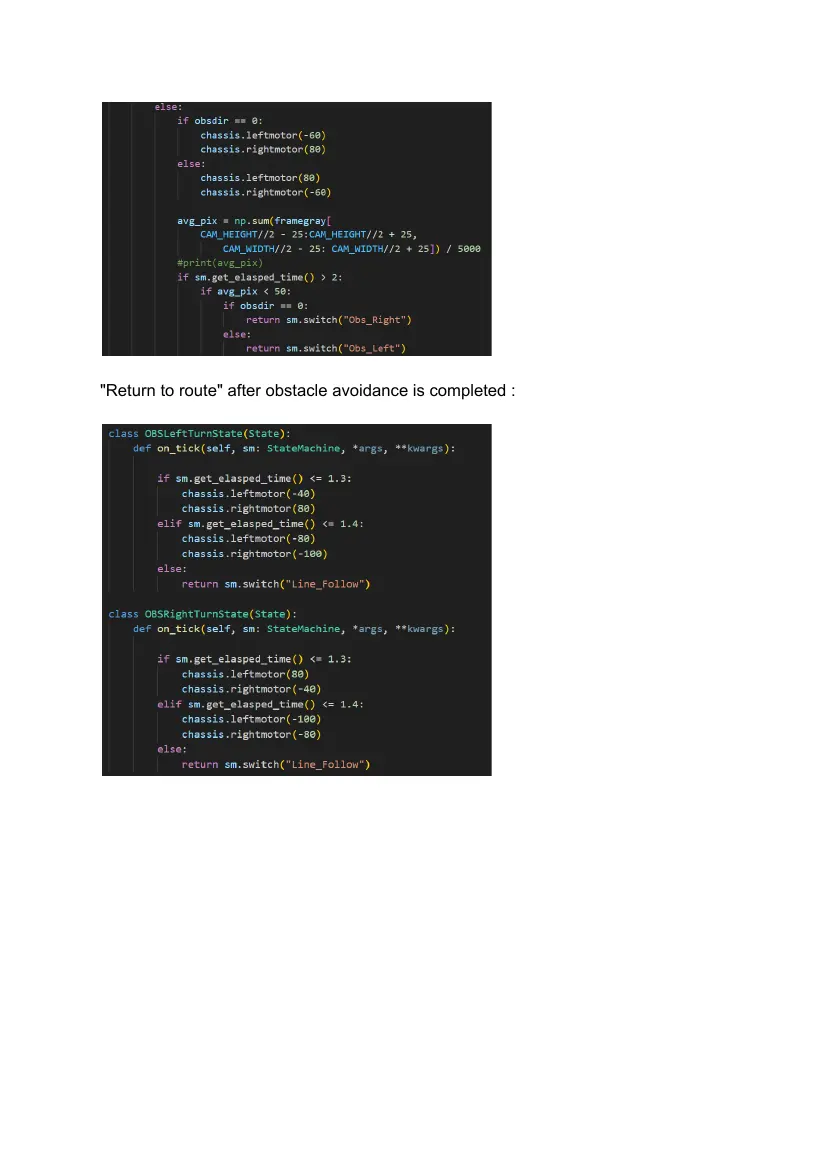
2. Program
These are the programs for obstacle avoidance.
When touch detects obstacles:
Get around obstacles:
"Return to route" after obstacle avoidance is completed :
3.Red or green evacuation
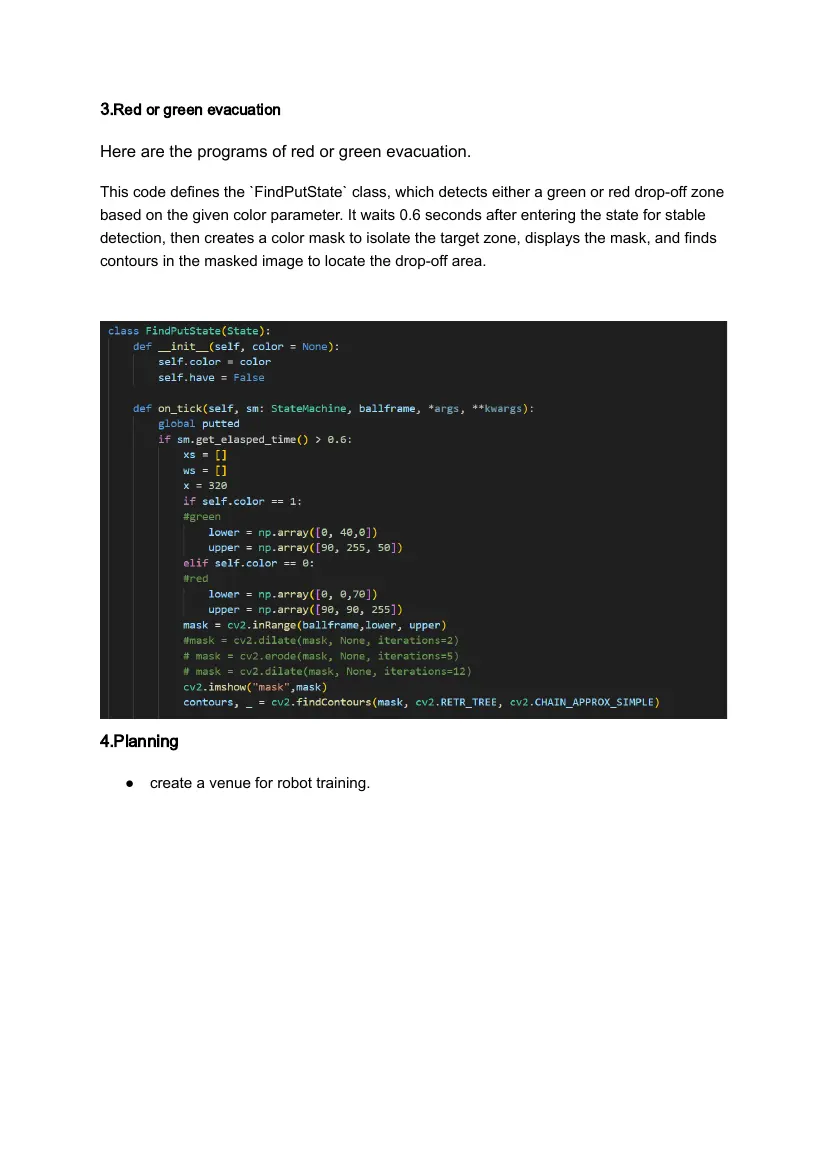
Here are the programs of red or green evacuation.
This code defines the `FindPutState` class, which detects either a green or red drop-off zone
based on the given color parameter. It waits 0.6 seconds after entering the state for stable
detection, then creates a color mask to isolate the target zone, displays the mask, and finds
contours in the masked image to locate the drop-off area.
4.Planning
● create a venue for robot training.
Log number: 9 Event date: 27th of March,2026
Members attended: Li Cheng Lok, Lloyd, Mike.V, Wong Ioi Cheng
Editor: Lloyd
Location: Macau Pui Ching Secondary School Innovation Science and Education
Center
1. Tasks done today
● create a venue for robot training.
2. Photos
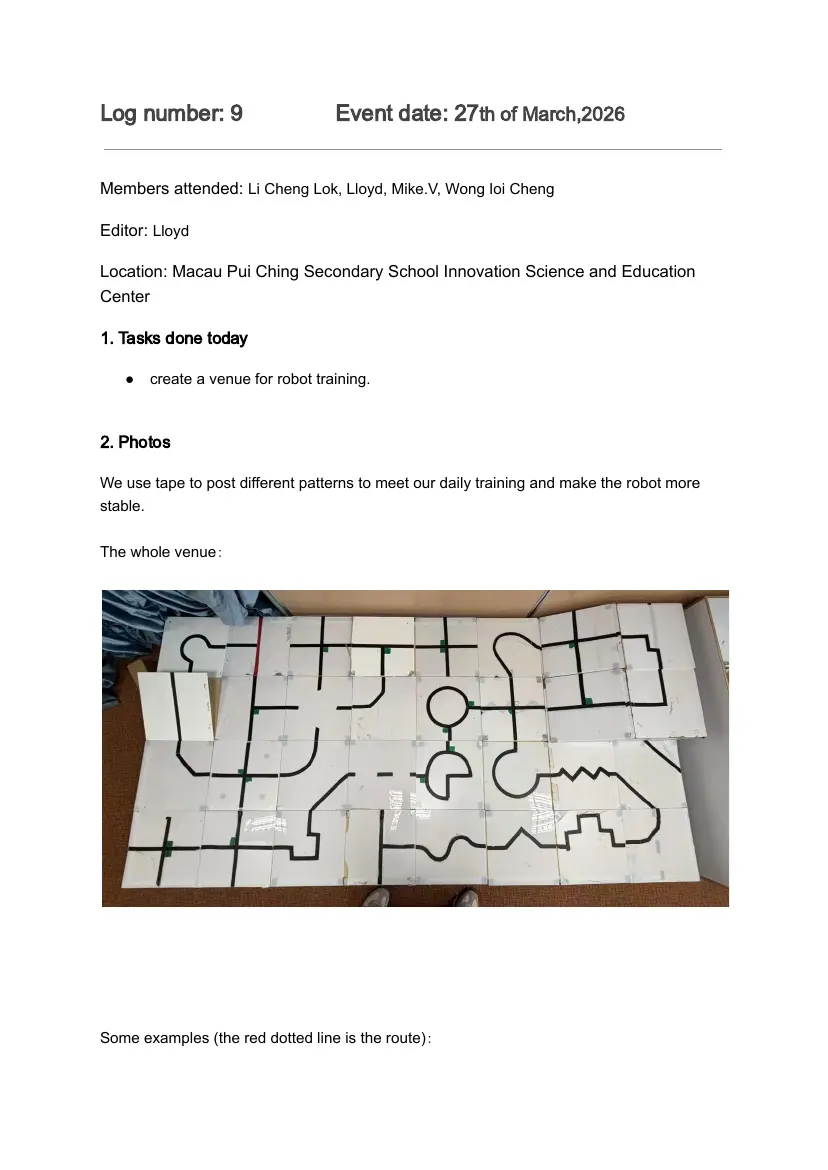
We use tape to post different patterns to meet our daily training and make the robot more
stable.
The whole venue:
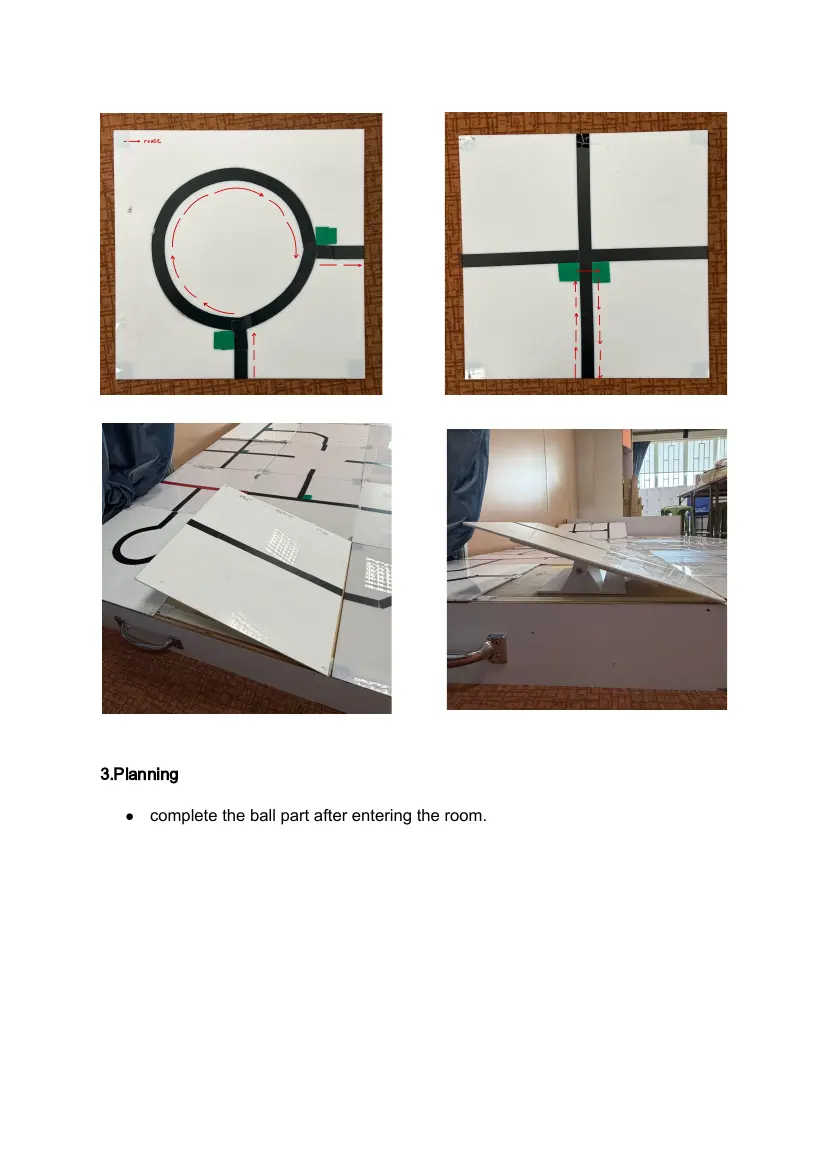
Some examples (the red dotted line is the route):
3.Planning
● complete the ball part after entering the room.
Log number: 10 Event date: 1st of April,2026
Members attended: Li Cheng Lok, Lloyd, Mike.V, Wong Ioi Cheng
Editor: Lloyd
Location: Macau Pui Ching Secondary School Innovation Science and Education
Center
1. Tasks done today
● complete the ball part after entering the room.
2. Program
Included:
● Seek ball
● Detection ball (YOLO)
● Pick up the ball
● Find the putting area
● Selease the ball
● Counting the number of balls picked up and the number of balls released
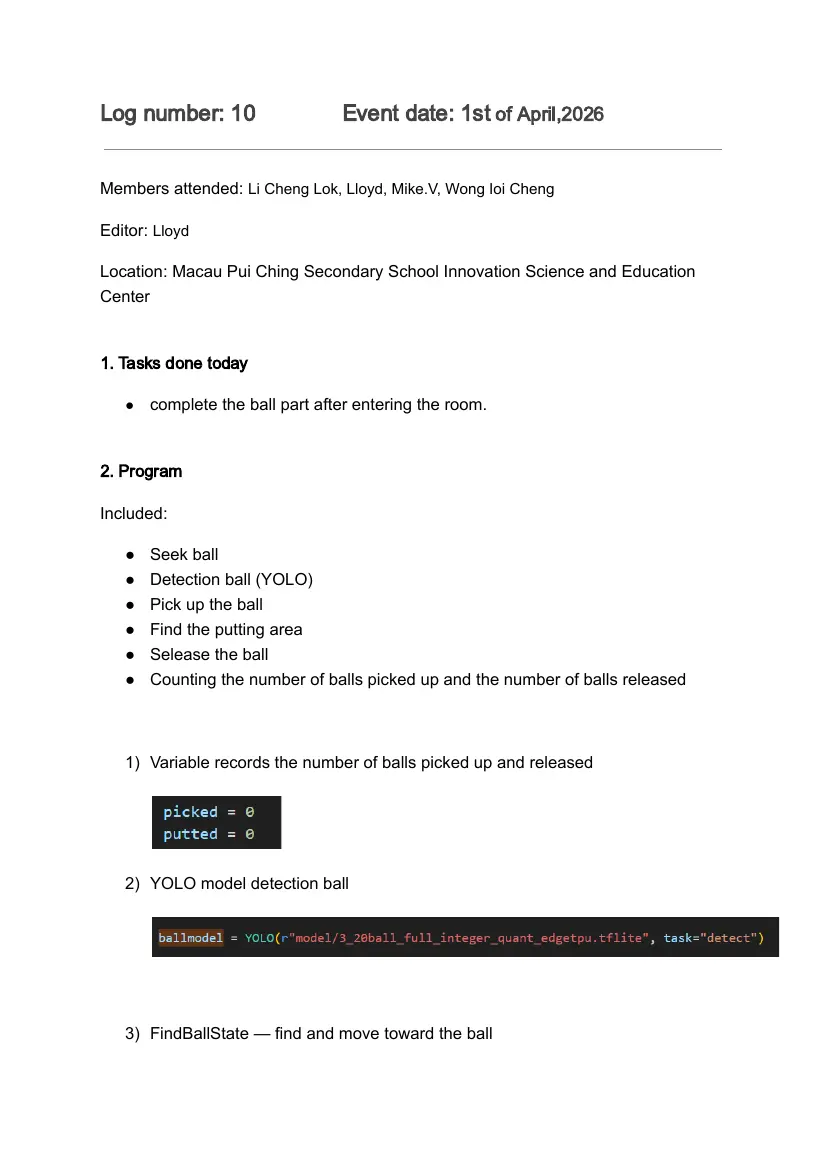
1) Variable records the number of balls picked up and released
2) YOLO model detection ball
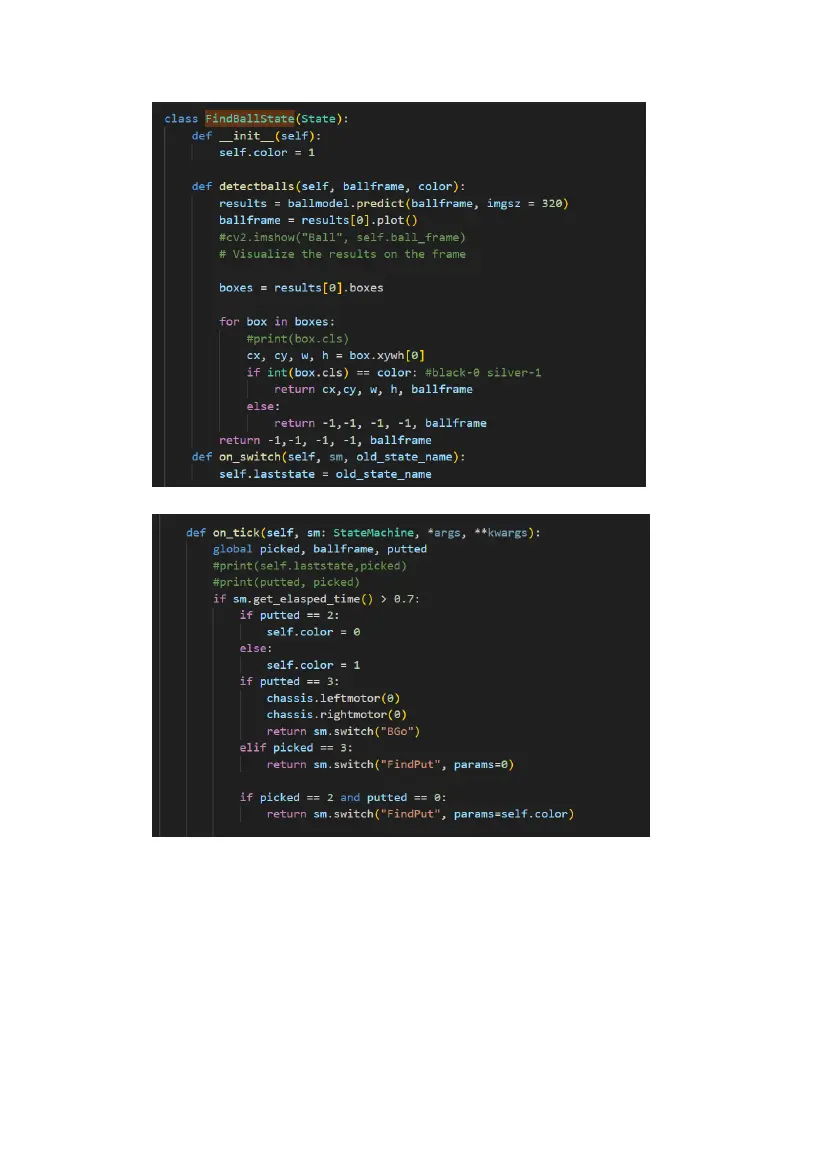
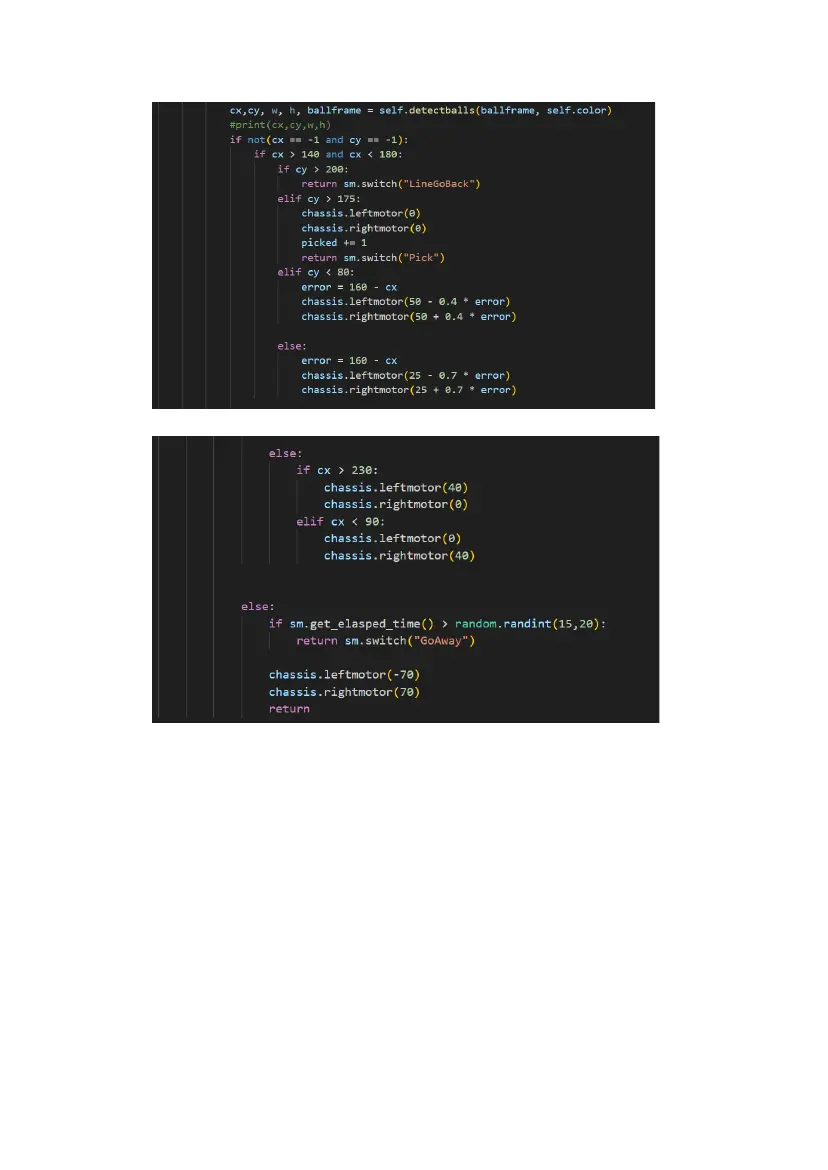
3) FindBallState — find and move toward the ball
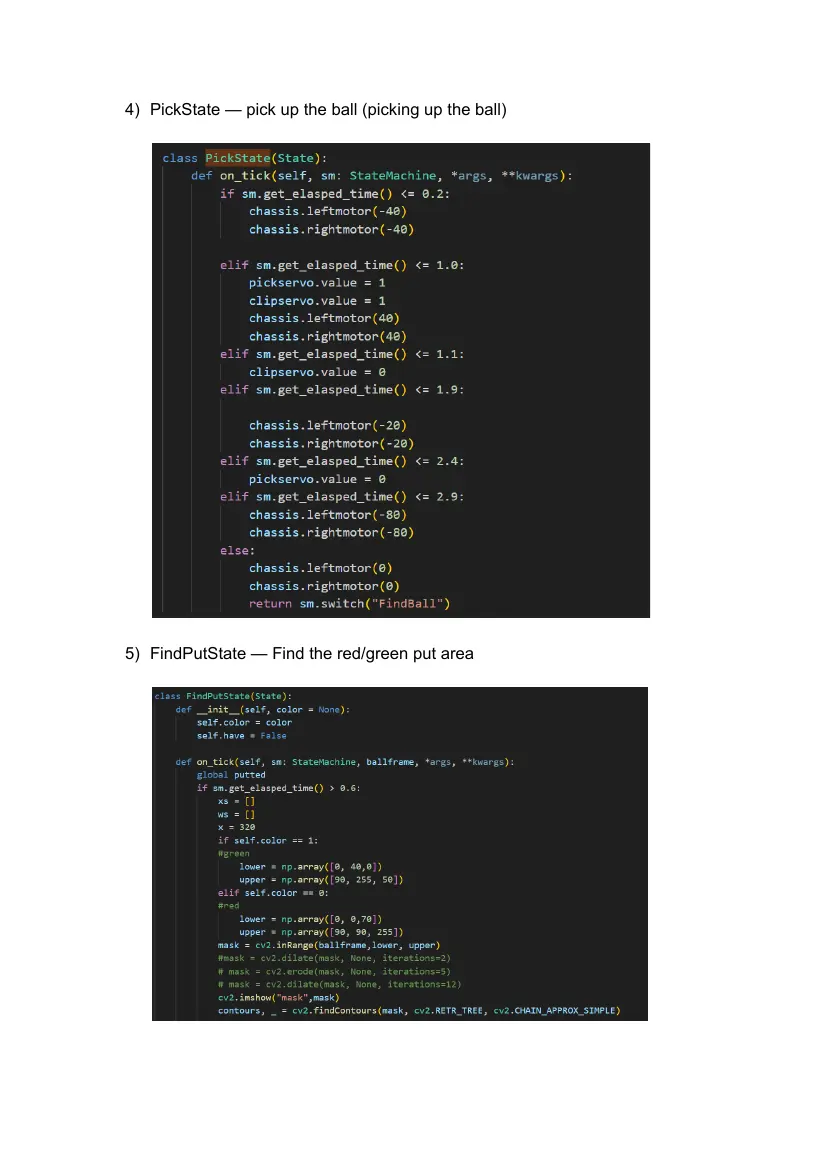
4) PickState — pick up the ball (picking up the ball)
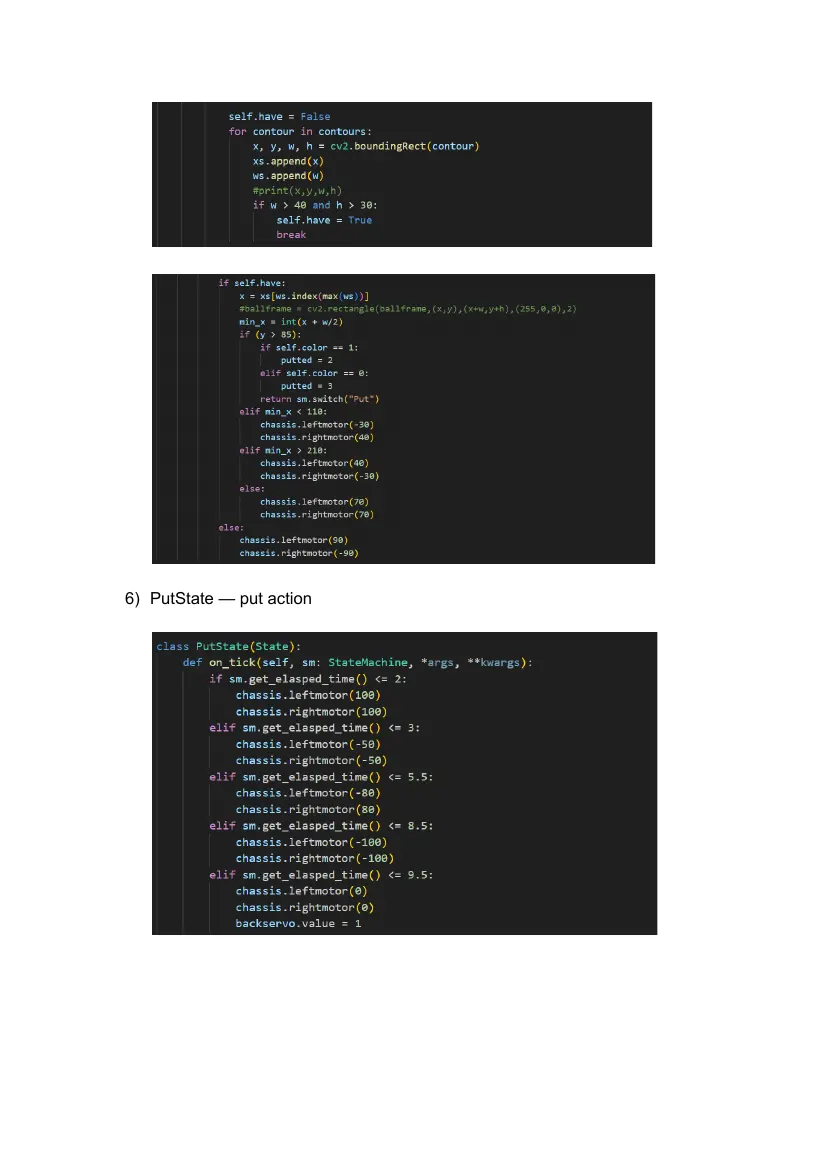
5) FindPutState — Find the red/green put area
6) PutState — put action
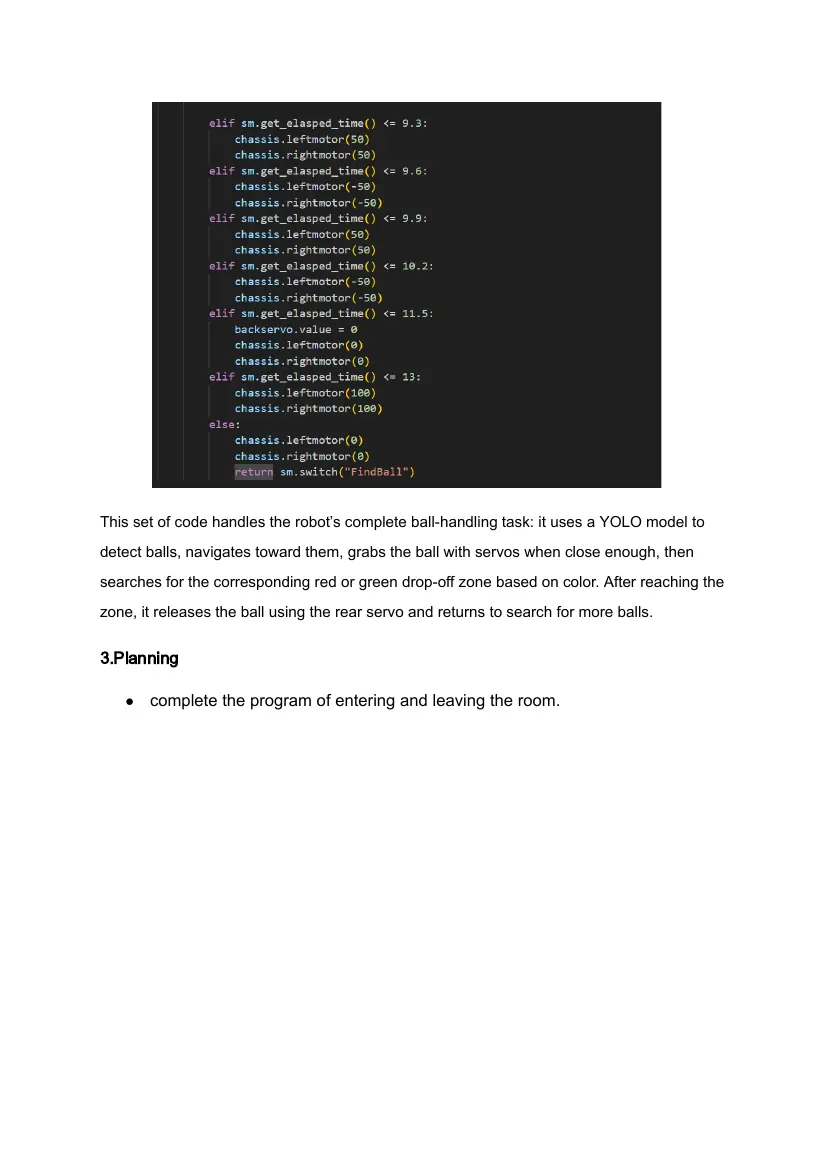
This set of code handles the robot’s complete ball-handling task: it uses a YOLO model to
detect balls, navigates toward them, grabs the ball with servos when close enough, then
searches for the corresponding red or green drop-off zone based on color. After reaching the
zone, it releases the ball using the rear servo and returns to search for more balls.
3.Planning
● complete the program of entering and leaving the room.
Log number: 11 Event date: 5th of April,2026
Members attended: Li Cheng Lok, Lloyd, Mike.V, Wong Ioi Cheng
Editor: Lloyd
Location: Macau Pui Ching Secondary School Innovation Science and Education
Center
1. Tasks done today
● complete the program of entering and leaving the room.
2. Program
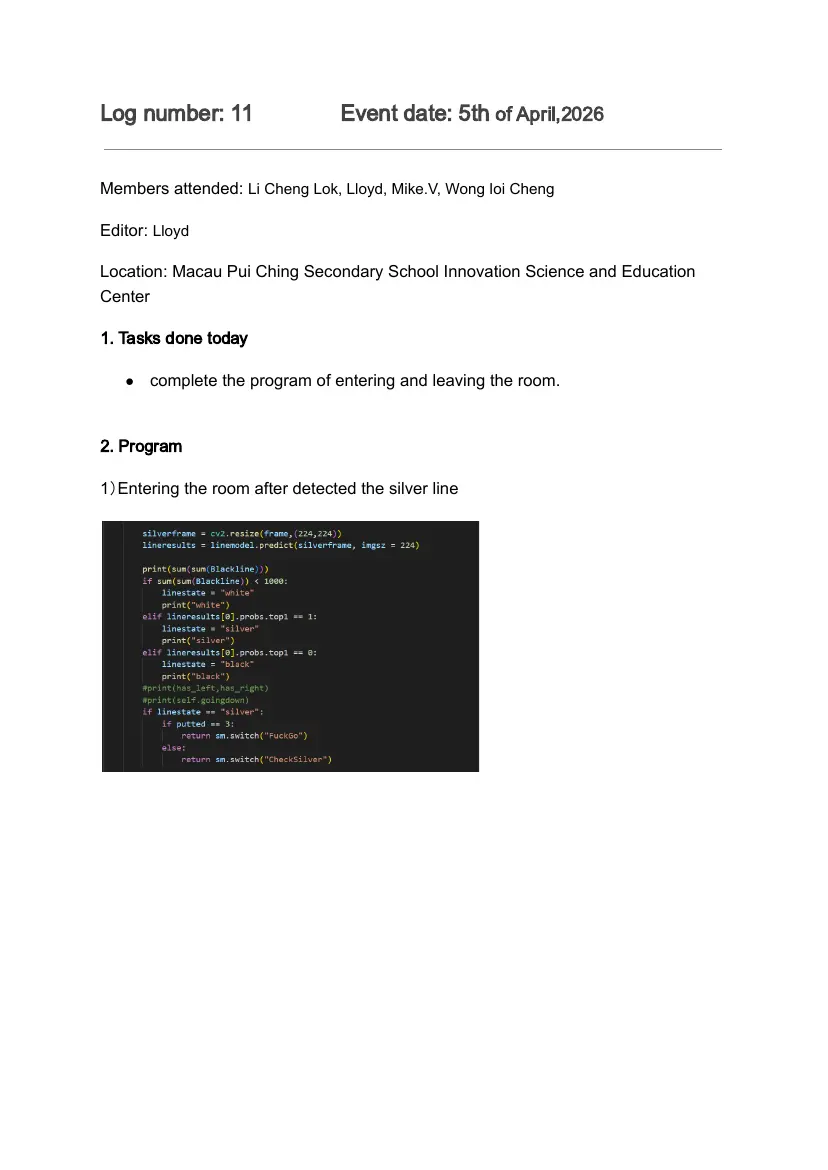
1)Entering the room after detected the silver line
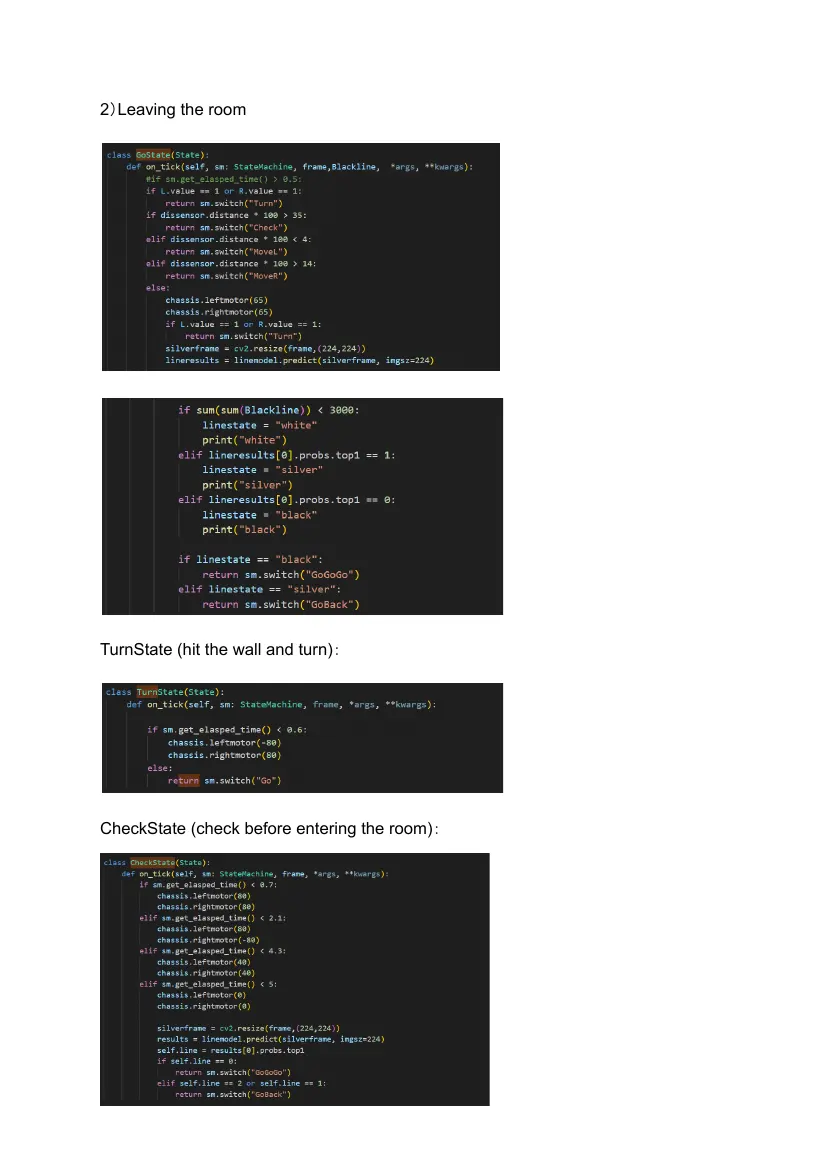
2)Leaving the room
TurnState (hit the wall and turn):
CheckState (check before entering the room):
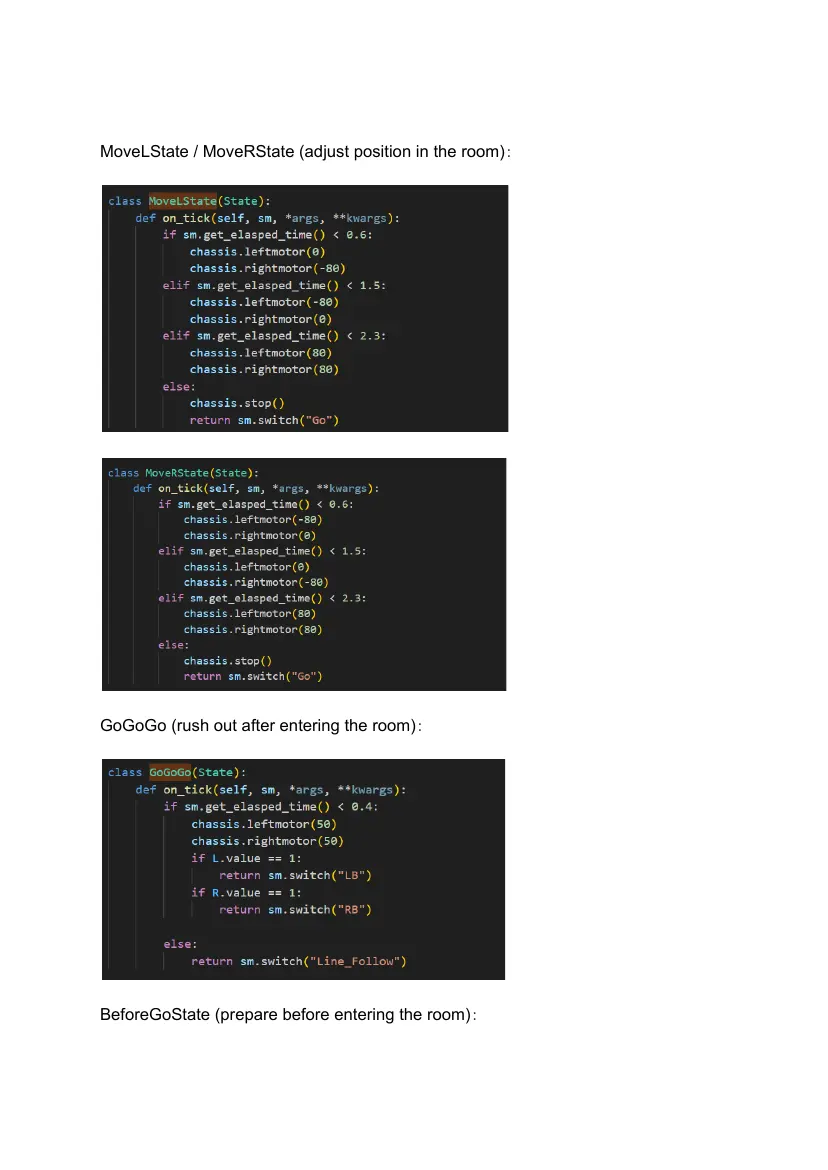
MoveLState / MoveRState (adjust position in the room):
GoGoGo (rush out after entering the room):
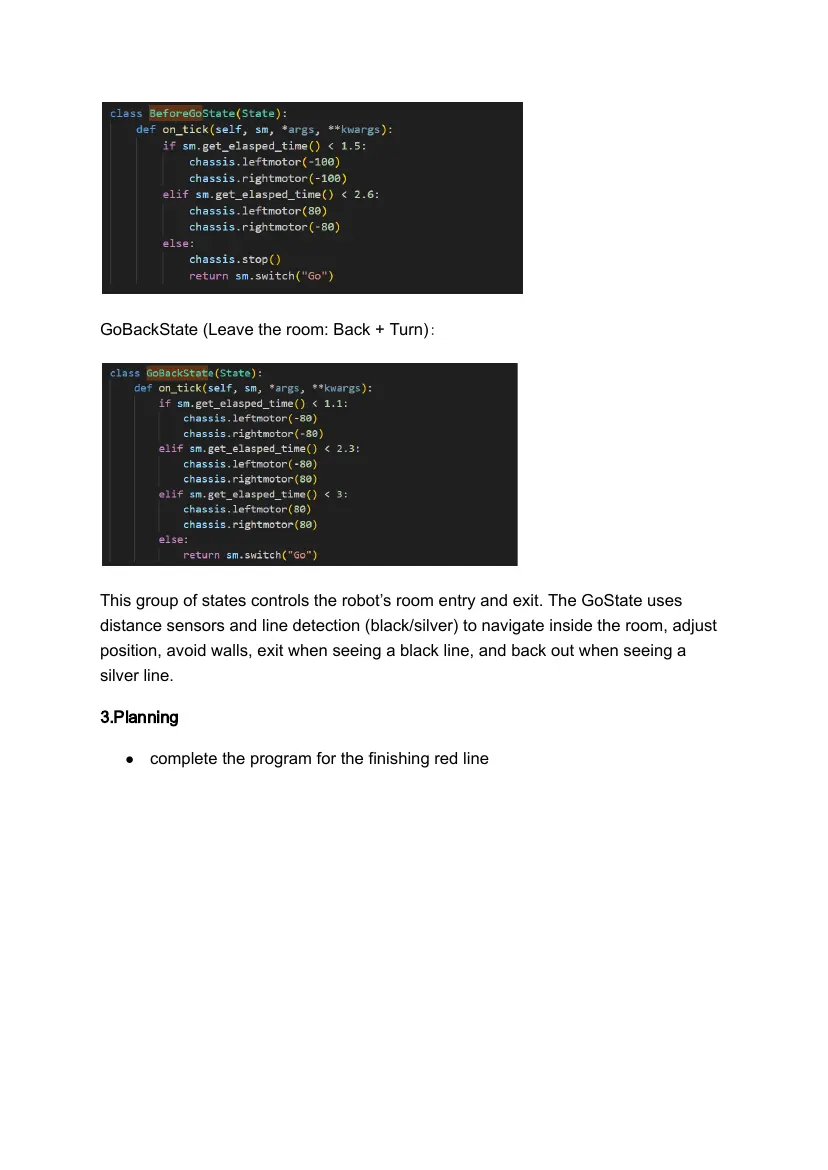
BeforeGoState (prepare before entering the room):
GoBackState (Leave the room: Back + Turn):
This group of states controls the robot’s room entry and exit. The GoState uses
distance sensors and line detection (black/silver) to navigate inside the room, adjust
position, avoid walls, exit when seeing a black line, and back out when seeing a
silver line.
3.Planning
● complete the program for the finishing red line
Log number: 12 Event date:11th of April,2026
Members attended: Li Cheng Lok, Lloyd, Mike.V, Wong Ioi Cheng
Editor: Lloyd
Location: Macau Pui Ching Secondary School Innovation Science and Education
Center
1. Tasks done today
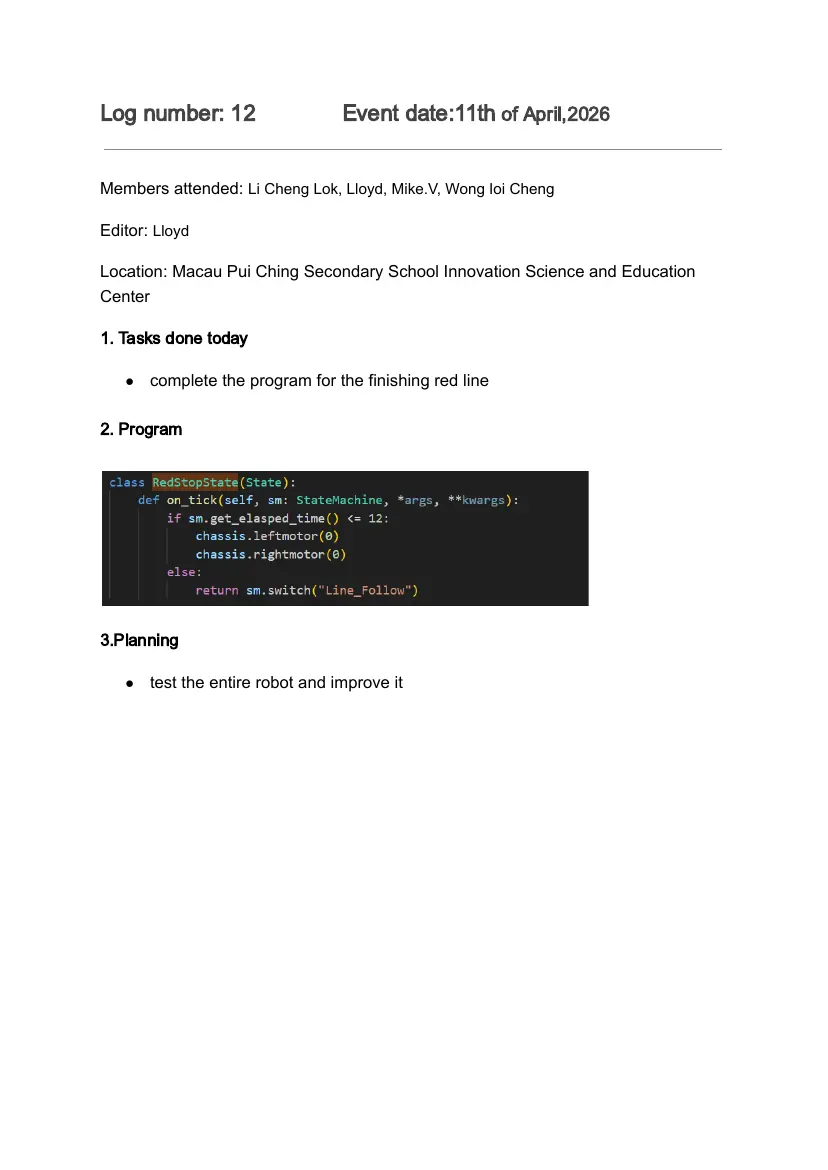
● complete the program for the finishing red line
2. Program
3.Planning
● test the entire robot and improve it
Log number: 13 Event date:11th of April,2026
Members attended: Li Cheng Lok, Lloyd, Mike.V, Wong Ioi Cheng
Editor: Lloyd
Location: Macau Pui Ching Secondary School Innovation Science and Education
Center
1. Tasks done today
● test the entire robot and improve it
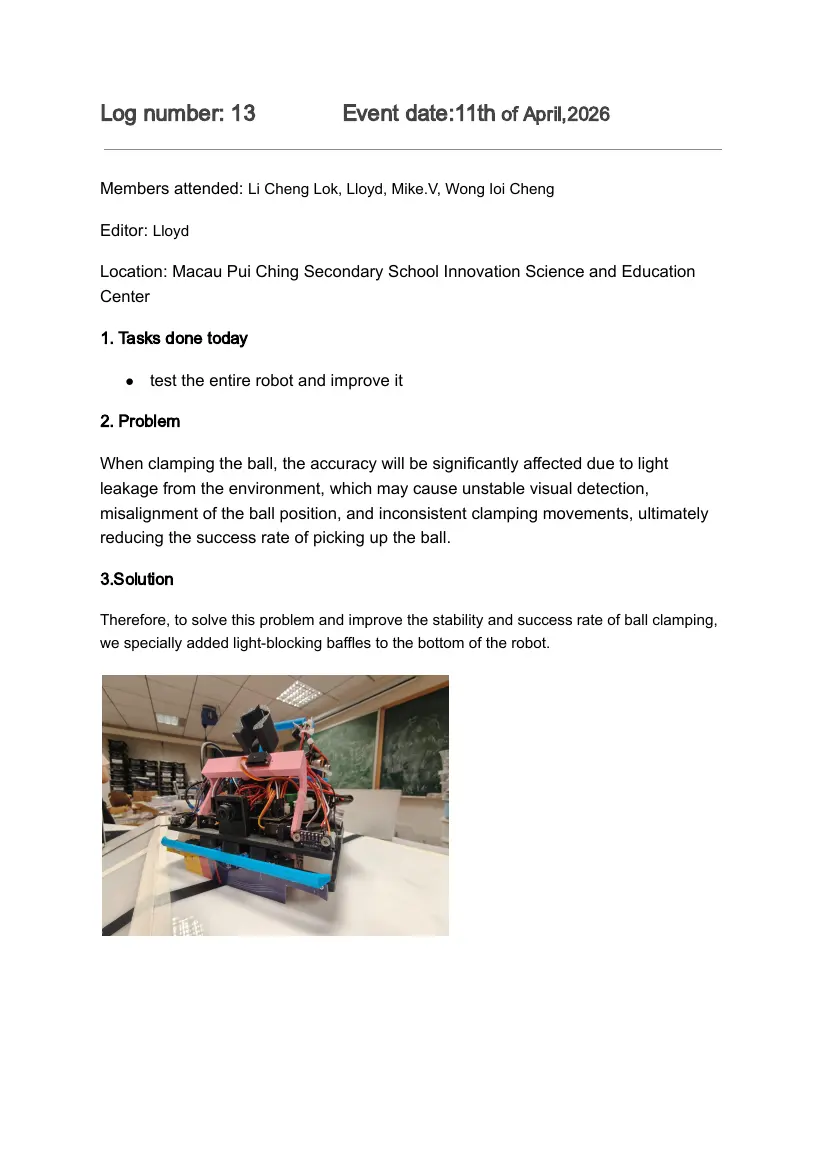
2. Problem
When clamping the ball, the accuracy will be significantly affected due to light
leakage from the environment, which may cause unstable visual detection,
misalignment of the ball position, and inconsistent clamping movements, ultimately
reducing the success rate of picking up the ball.
3.Solution
Therefore, to solve this problem and improve the stability and success rate of ball clamping,
we specially added light-blocking baffles to the bottom of the robot.
41 pages, rendered as images so they load quickly. The text above is the document's own, extracted from the PDF.
Source code
The team's own source code, 4.0 MB. It is a download rather than part of this page, because a zip is something you open on your computer. It comes from GitHub, which some school networks block.